
How AI Agents Can Cut Manual QA by 30%
Authors


Two days waiting for QA feedback can turn a small fix into another round of rebasing and context switching. Multiply that delay across a few platforms, like mobile, web, and TV, and the release schedule starts to depend on how quickly the team can verify changes.
We proposed an agentic QA workflow for a streaming product facing this problem, targeting a 30% reduction in manual QA hours per release. The workflow combines mobile and browser agents with TV-specific checks to shorten feedback loops and reduce manual investigation and reporting.
When developers receive actionable findings sooner, they can address failures while the change is still fresh. QA teams could also spend less time reproducing issues and assembling reports, leaving more capacity for further testing.
To see where that capacity could be recovered, we’ll start with how manual QA time is spent. Then we’ll follow a pull request through the workflow, examine what the projected gains could mean for delivery, and explain how to validate them.
Where manual QA time goes
Cross-platform regression testing checks whether existing behavior still works after a change across the platforms a product supports. For our streaming app example, that can involve touch interactions on a phone, browser navigation, and remote-control focus on a TV. Shared code still needs checks against those different interactions.
For the streaming product we set out to improve, manual QA was estimated to take as much effort as feature development. Release regression could occupy the team for several days, while feedback on a pull request could take around two days.
We estimated the distribution of QA effort as follows:
- Testing and cross-platform regression: 50%.
- Bug reproduction: 25%.
- Tickets, descriptions, and evidence gathering: 10%.
- Exploratory work, accessibility, sign-off, and lab activities: 15%.
In this estimated split, bug reproduction, evidence gathering, and report preparation together account for 35% of QA effort. After a test fails, QA still needs to reproduce the behavior, gather evidence, and describe the issue clearly enough for an engineer to act. That work adds to the time between finding a defect and getting a fix underway.
Connecting tests, evidence, and reporting
For workloads like this, we recommend connecting test selection, execution, evidence collection, and reporting. A failed check should carry the context needed to investigate it, reducing the manual work of reconstructing what happened and assembling a report.
Agents need test scenarios that describe what to check and what should happen. If your team hasn’t defined those yet, start by documenting the steps and expected results for the user flows you want to verify. Agents can then carry out those checks on a device or in a browser, with the workflow providing test data, access to builds and devices, and a consistent reporting format.
The team’s existing automated test suite would remain unchanged and run separately from the agentic QA workflow.
A risk selector identifies relevant scenarios and platforms, while a coordinating agent, or orchestrator, delegates checks to device and browser agents and collects their results. A shared knowledge base holds user flows, defect history, and reference scenarios describing expected behavior.
For mobile checks, agent-device lets the agent inspect the app's interface, perform actions, and capture evidence such as screenshots, recordings, and logs. The agent or test harness decides what to verify, and agent-device supplies the commands to interact with the app.
The evidence pipeline would collect screenshots, recordings, and logs from agent runs and make them available for failure investigation and bug reporting. A reviewer could then inspect that evidence alongside the reproduction steps.
Our Automating Mobile QA With Cloud Agents walkthrough explains how agent execution, device control, and continuous integration (CI) fit together. In the QA workflow for our streaming app example, evidence from agent runs would support failure investigation and bug reporting.
One pull request through the system
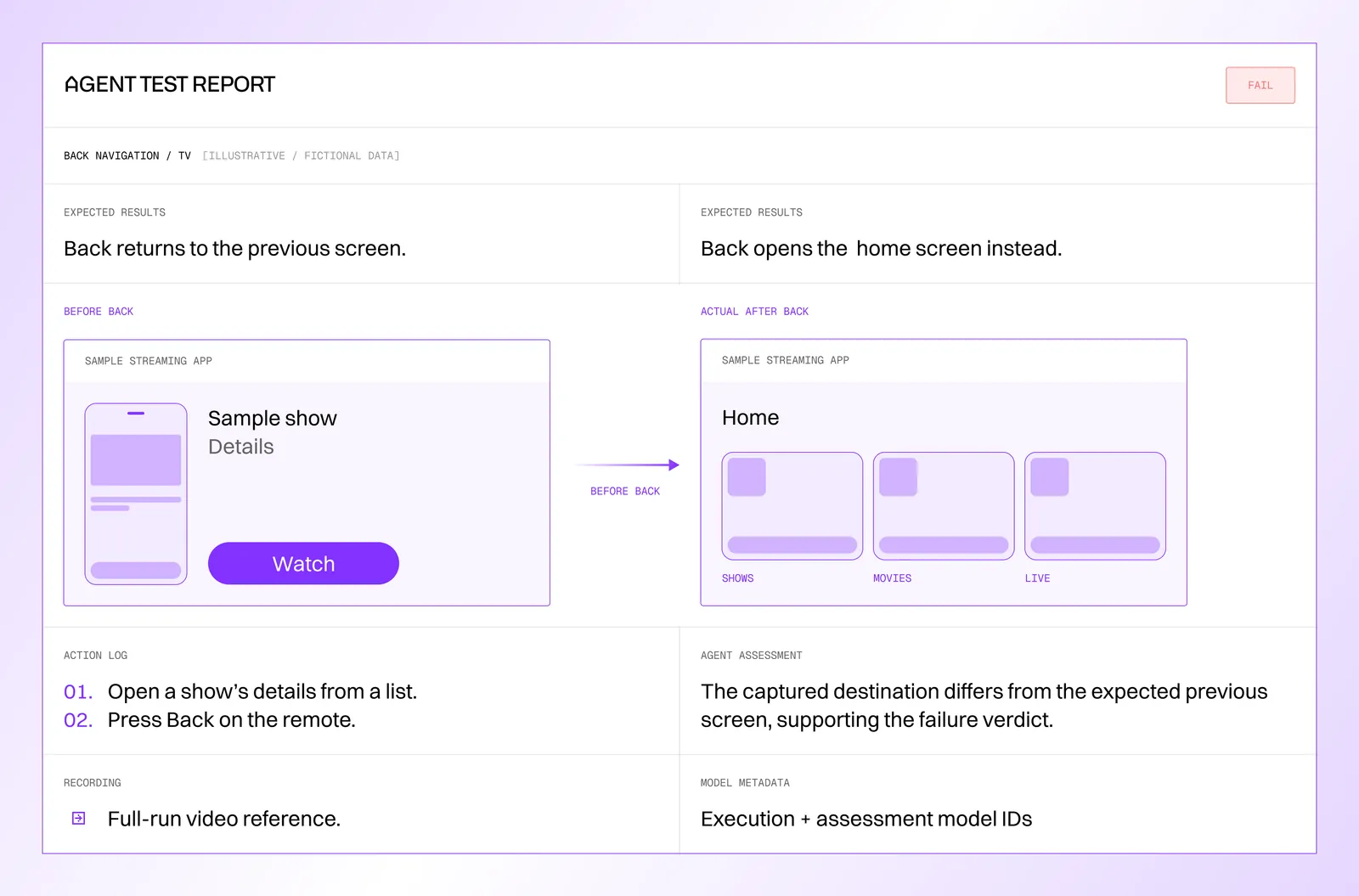
Imagine a pull request that changes shared navigation in a streaming app. The expected behavior includes opening a show’s details page and returning to the previous screen.
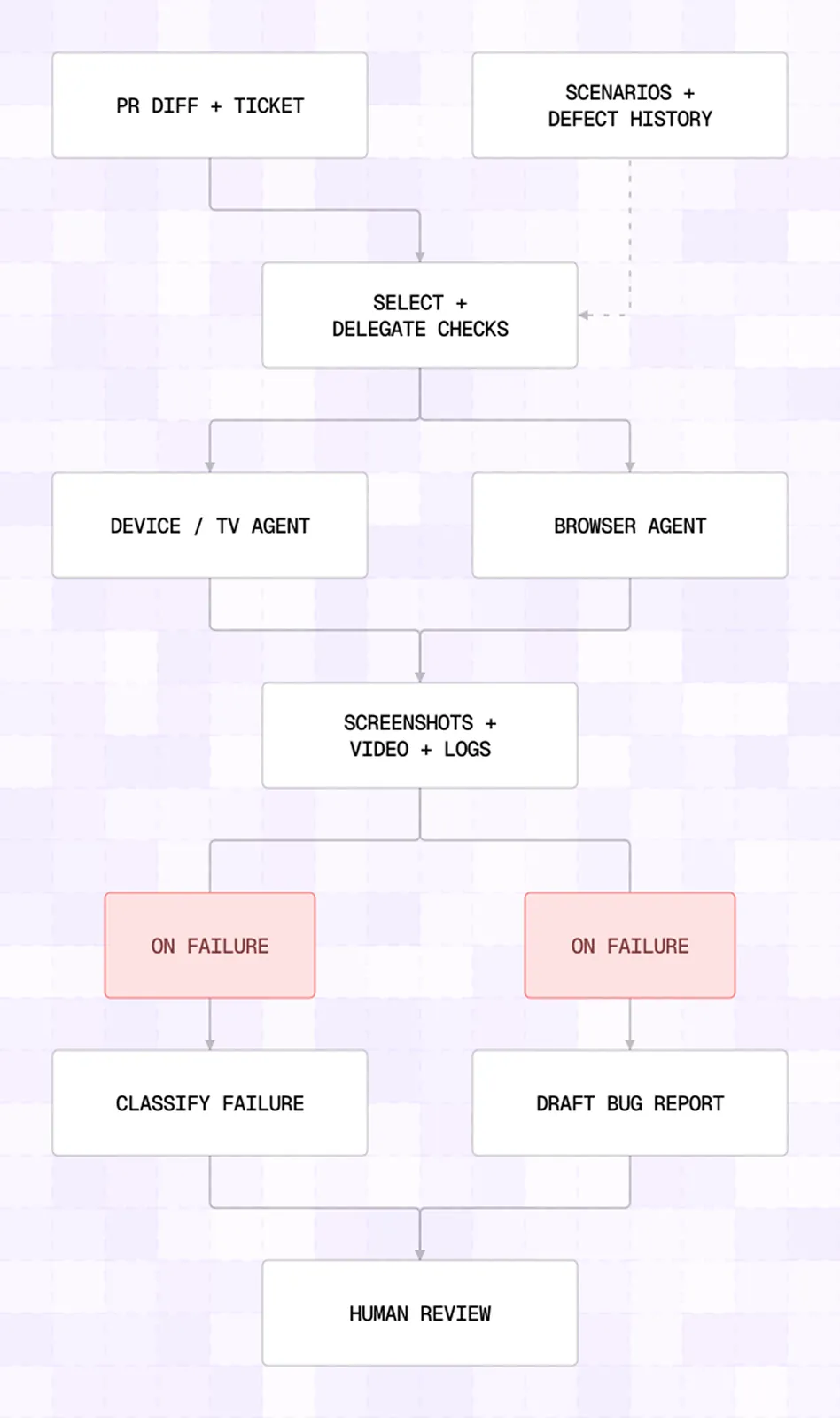
The risk selector first reads the diff and the related ticket. It combines the code dependency graph with reference scenarios, defect history, and ownership information to propose which flows and platforms to test. Business criticality, historical flakiness, and time since the last run help prioritize those checks. Each mapping has a confidence level, and where the mapping is uncertain, the plan expands to a broader smoke-test pack.
For this example, the plan would include the relevant phone and browser flows plus a TV navigation check. On TV, that check would exercise the remote's directional pad (D-pad), the focused element, and the back action. The execution plan also specifies an order and a device-farm budget. The orchestrator then delegates work to the appropriate agents. Each run collects screenshots, video, logs, and application state where available. A failed back-navigation check carries the evidence needed to investigate how the app reached that state.
As run evidence becomes available, failure classification and report drafting can proceed in parallel. A product defect, an intermittent test failure, and an unavailable device require different responses. The triage engine would classify failures while a bug-drafting agent assembles the reproduction steps, device context, and supporting artifacts. Both outputs would be available for human review.
The reviewer would receive the finding together with the evidence needed to investigate it. The illustrative report below applies that structure to the back-navigation example, using fictional scenario details and placeholders for evidence and model identifiers:
The projected gains, with their scope
For this workflow, we estimate the following improvements:
| Activity or measure | Starting point in the estimate | Projected outcome |
|---|---|---|
| Manual QA hours per release | Current manual effort | 30% reduction |
| Testing per pull request | 8 to 16 hours | 1 hour |
| Cross-platform release regression | About 5 days | 8 hours |
| PR feedback | Around 2 days | 2 hours |
| Bug-ticket drafting | 30 minutes per defect | 2 minutes |
These measures describe different parts of the QA process. The 30% target concerns total manual effort. The larger reductions concern specific activities; we would measure each separately during validation. Further reductions may be possible as the team validates more scenarios and expands its use of agents.
For release regression, the wait for results also depends on how many checks the device lab can run at once. With more devices, the team can run more tests in parallel and expand testing capacity, provided the device and model-usage budgets support it. The human effort needed to review findings remains a separate measure.
What the capacity gain would be worth
Think of a team of 20 QA engineers and 30 developers, each working 40 hours a week for 48 weeks a year. For this illustrative example, let’s use hourly costs of $38 for QA and $100 for development.
A 30% reduction in QA effort and recovery of 10% of developer time through faster feedback would free capacity valued at approximately $438,000 for QA and $576,000 for development per year: about $1.01 million combined.
This calculation illustrates what meeting those targets could be worth, before accounting for the costs of building, integrating, and running the QA workflow. The said team could use the time for broader test coverage or additional product work. Whether it translates into cash savings depends on staffing and spending decisions.
To assess the first-year business case, you need to compare that annual capacity value with the initial implementation and integration costs plus a year of operating expenses. Those operating expenses include model usage, devices and test infrastructure, test and knowledge-base maintenance, and the human time needed to review findings.
Validate time savings against defect detection
That annual capacity estimate depends in part on a 30% reduction in manual QA effort. To test whether that is realistic for your product, choose a set of flows your QA team already tests and run agents and testers against the same builds. Record manual effort, including the time spent reviewing agent findings, and compare the defects each finds.
For the workflow described here, a four-week comparison could test two targets: 30% fewer manual QA hours and detection of 95% of the bugs found by human QA. These are example targets; for your product, agree on the baseline, supported platforms, test scope, and success criteria before starting.
You need to review the missed defects and incorrect reports alongside those percentages. Detecting 95% of the bugs found by human testers does not establish that the system catches 95% of all defects, and the severity of a missed issue matters.
Then, set the comparison period long enough to cover representative changes on the platforms in scope; four weeks may need extending if too few relevant changes occur.
In our streaming app example, the QA agent would not check audio/video synchronization, whether the correct video content is playing, or playback dips and artifacts. These would need separate instrumentation or human review. For checks that depend on data inside the app, Appduct lets the team expose app functions and events to agents. The team would still need to implement and validate the checks for playback quality.
One more thing to remember is that working phone flow does not establish correct focus movement or remote-control behavior on TV. Validate those interactions on the supported TV devices before counting the flow as covered.
Start with the QA work delaying your next release
Document a familiar user flow: the steps, expected results, test data, and setup needed to repeat it.
Choose that first flow from the recurring QA work holding up releases. Running agents alongside the current process on the same builds lets you compare the human effort involved and how long developers wait for feedback. Include the time spent investigating findings and reviewing reports. Those results can guide whether to extend the workflow to another flow or platform.
If cross-platform QA is holding up your releases, talk to us about a scoped QA pilot. We can define the first workflow and the evidence needed to judge its effect on release time and manual effort.


