React Native Legal: Zero-Config OSS License Screens for Your App

Authors
Piotr Tomczewski
Software Developer
@
Callstack
Mateusz Mędrek
Software Developer
@
Callstack

Open source libraries are everywhere in mobile development. As React Native developers, we especially thrive on OSS, but we often don’t realize that by using free software, we’re obligated to give it a certain kind of acknowledgement. And a NOTICE file or internal documentation is not enough. Licenses like MIT, BSD, or Apache 2.0 often require acknowledgement in the app itself.

We’ve observed that developers either do it manually (when approached by people from the legal department, they didn’t even know it existed) or don’t do it at all, hoping for the best.

Callstack engineers working for enterprise clients many times experienced such a task. What they typically did then was write some custom scripts for crawling node_modules and tying it together with platform-native tools for iOS and Android, such as LicensePlist, to get the data and present it in a way that feels right for the platform. That’s a lot of repetitive work that not only we, but likely many other React Native developers out there, do.

That’s why we built React Native Legal—a zero-config, cross-platform tool that handles license metadata generation and in-app display for you. All with a single command.

React Native Legal uses native-standard tools under the hood, such as AboutLibraries for Android and LicensePlist for iOS, orchestrating it from a command-line interface. Run a single command, and you’ll get up-to-date license metadata for all your direct and transitive dependencies.

In addition to that metadata, it gives your app a native-style “Used open source libraries” screen on all major platforms: iOS, Android, tvOS, and AndroidTV, which you can display however you like. For iOS, it will register this screen inside the app’s settings page in the Settings app.

To get started with React Native Legal, install it using:

npm install react-native-legal

Expo CLI projects

When in Expo app, just add the react-native-legal config plugin in your app.json:

{
  "expo": {
    "plugins": [
+      "react-native-legal"
    ]
  }
}

Then rebuild with npx expo prebuild or eas build, and you’re good to go.

This library can't be used in the "Expo Go" app because it requires custom native code.

React Native Community CLI projects

When in the Community CLI app, run the following command to generate license metadata:

npx react-native legal-generate

Run it every time you add a new dependency or before building the native app, ideally automated with an npm-script.

Displaying the OSS Licenses screen

Now you can use ReactNativeLegal.launchLicenseListScreen() method to display the list of OSS libraries used in your app:

import { Button } from 'react-native';
import { ReactNativeLegal } from 'react-native-legal';

<Button
  title="Open Source Licenses"
  onPress={() =>
	  ReactNativeLegal.launchLicenseListScreen('Open Source Licenses')
	}
/>

And that’s it. When pressing that button, or accessing from iOS app Settings page, you’ll get a list of all available libraries and their license text.
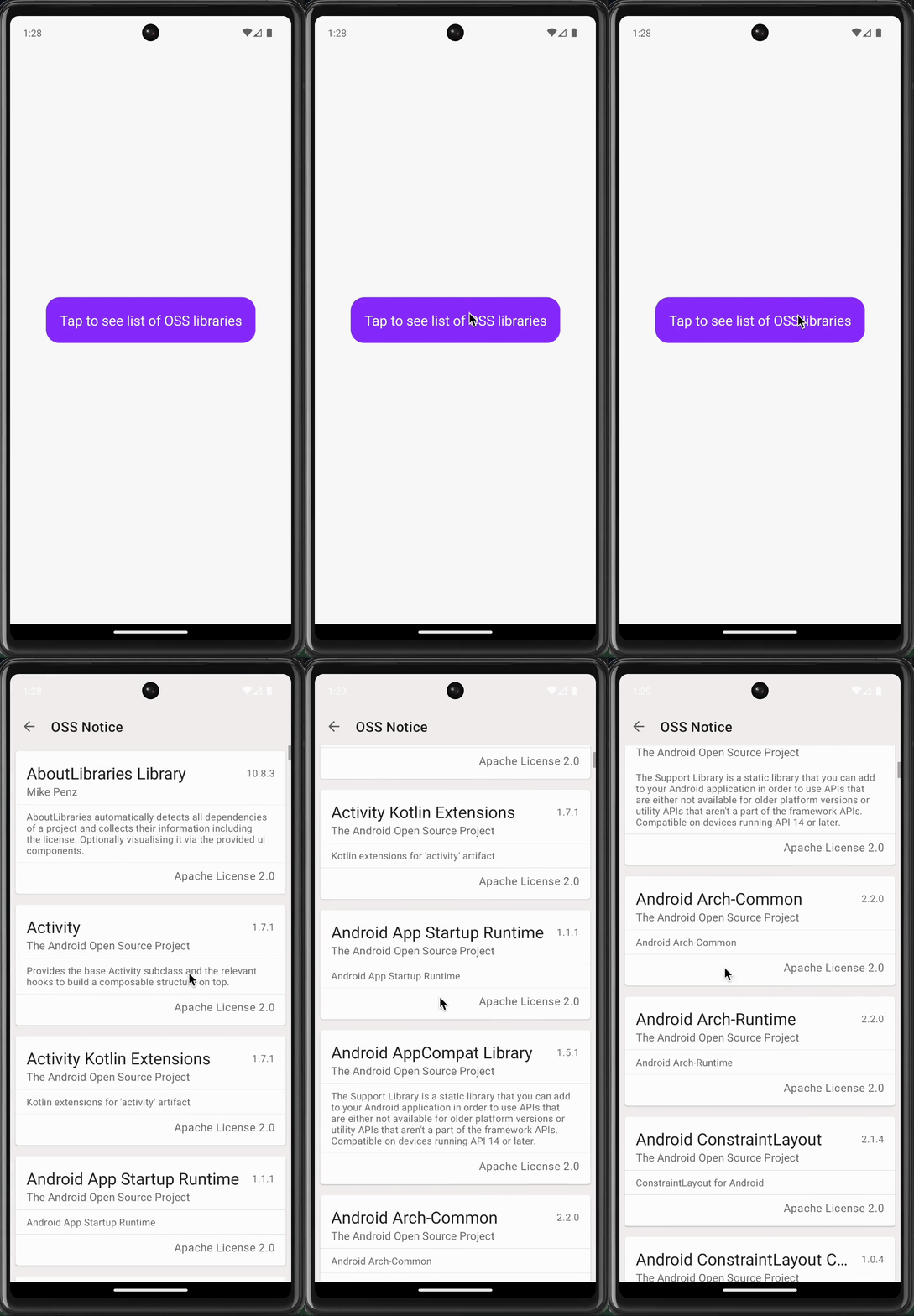
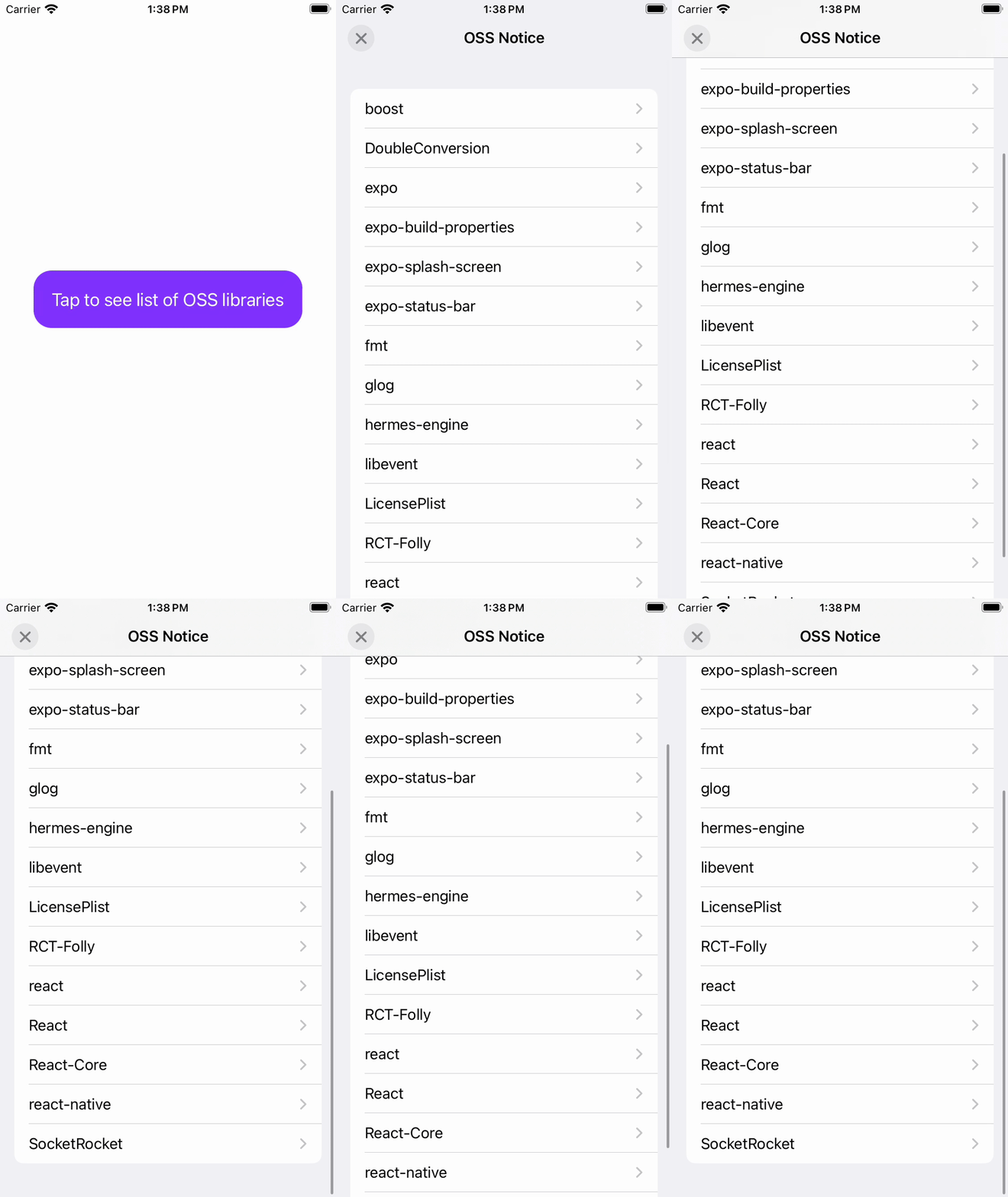
Give it a try

Acknowledging your app’s dependencies isn’t optional—it’s a professional standard. With React Native Legal, it’s finally easy to do the right thing. Try it in your app, star the repository on GitHub, and let us know your experience. We’re always looking for feedback to make the developer experience better for everyone.

Insights

Learn more about Security

cover

Dec 17Podcast

A (Secure) Christmas Carol: The Story of Npmezer Scrooge

A holiday story about npm audits, unpinned dependencies, and the real cost of ignoring JavaScript security warnings.

cover

Aug 20Article

Secure Communication Between Isolated React Native Instances

react-native-sandbox now supports secure, direct communication between sandboxed React Native instances, modeled after the web’s postMessage API with origin-based access control.

cover

Jul 3Podcast

Authorization: Security Deep-Dive With Okta (Part 2)

Let's talk access control, delegated authorization, and more. Learn modern security frameworks and get tips for creating reliable apps.

cover

Jul 2Podcast

Authentication: Security Deep-Dive With Okta (Part 1)

Join us as we discuss authentication's past, present, and future. From MFA to passkeys, learn how to enhance security and efficiency in your applications.

cover

Mar 8Article

Learn Once, Hack Everywhere

Demystify reverse engineering of mobile apps, dive into tools, analyze .apk files, and secure React Native code with our article.

cover

Feb 21Article

SSL Pinning in React Native Apps

Learn to implement SSL pinning to future-proof your React Native app against security attacks. Dig deeper into native SSL implementations for iOS & Android.

cover

Oct 28Article

Stripe Identity: ID Authentication Made Simple

Learn about preventing fraud with Stripe Identity React Native SDK.

cover

Nov 21Article

Secure Your React Native app

Learn how to make your React Native app as secure fot your application and customers.

cover

Mar 19Tutorial

The Hard Way vs. The React Native AI SDK Way: Stop Writing Custom Modules for Every Model

Learn how React Native AI uses a unified provider model to switch between cloud and on-device LLMs without rewriting application logic, enabling reliable AI experiences online and offline.

cover

Mar 12Tutorial

Build Smarter Apps: Tool Calling & AI Orchestration Explained

Learn how on-device models in React Native can call tools, interact with external APIs, and return structured outputs you can use directly in application logic.

cover

Mar 5Tutorial

MLC LLM + React Native: On-Device AI Without the Pain

Learn how to run third-party on-device LLMs in React Native using MLC LLM. Choose your models, run them efficiently across platforms, and keep a unified JavaScript API with React Native AI.

cover

Feb 24Tutorial

Intelligent Fallbacks with Apple Intelligence in React Native

Learn how to use Apple’s built-in Foundation Models in React Native apps, reduce memory usage, and enable fast, fully on-device AI with React Native AI Apple.

cover

Feb 10Tutorial

What Is the React Native AI SDK? A Complete Intro & Quickstart

Learn why on-device AI matters for React Native apps, how local LLMs behave offline, and what problems React Native AI is designed to solve from day one.

cover

Jan 29Tutorial

Implementing an Android TurboModule with Kotlin

Learn how to implement a React Native TurboModule on Android, from the TypeScript spec and Codegen to the Kotlin implementation and package registration.

cover

Jan 19Tutorial

Working with Different Threads in Swift TurboModules

Learn how JavaScript, native module, background, and main threads interact in React Native TurboModules, and how to use GCD queues to run async work safely in Swift.

cover

Jan 9Tutorial

How to Add Type-Safe Constants to Swift TurboModules

Learn how to expose typed, immutable constants from a Swift TurboModule using Codegen, and get full end-to-end type safety between native and JavaScript.

cover

Dec 30Tutorial

Adding Event Emitters to Your TurboModule in Swift

Learn how to emit native events from a Swift TurboModule and subscribe to them in JavaScript, including proper memory management and Codegen integration.

cover

Dec 22Tutorial

Writing Your First TurboModule in Swift

Learn how to build a fully working TurboModule in Swift, integrate it with Codegen, and bridge it through Objective‑C inside an Expo app.