
React Native + Webpack + HMR = ❤️
Authors

Recently we added Hot Module Replacement support to Haul, a command line tool for developing React Native apps based on Webpack.
If you use the default template with <rte-code>index.ios.js<rte-code> or <rte-code>index.android.js<rte-code>, all you need to do is to add <rte-code>import 'haul/hot';<rte-code> at the top of the file so our babel plugin can add HMR logic for you. In other cases you need to manually set it up. Hopefully this post will help you with setup and shed some light on how it actually works under the hood.
How HMR works in Haul
The middleware and hot client
The middleware provides a way to send notifications to a running application whenever Webpack rebuilds the bundle.

The obvious choice was to use webpack-hot-middleware, however it uses EventSource to communicate with the client, which is not natively supported and I had a few issues with it, so I settled on WebSocket and rewrote the middleware and the hot client from the ground-up to use WebSockets. With that said, Haul hot client and middleware still use some parts of the original webpack-hot-middleware.
The environment
When the hot middleware sends a message, the client needs to download the hot update, which contains updated module implementation with calls to Webpack’s HMR API.
However, by default Webpack adds a new <rte-code><script><rte-code> tags for each update and rely on a browser to load the code.
But in the React Native environment we don’t have the DOM so the update fails.

Fortunately, Webpack provides an option to change the templates with target property. Since there’s no react-native target, I used the webworker. It’s the closest to RN environment than any other, but there is a little catch.

The WebWorker target uses importScripts to load the hot update, which is available only in the WebWorker environment so we need to polyfill it. The native <rte-code>importScripts<rte-code> is synchronous, but the sync <rte-code>XMLHttpRequests<rte-code> are not supported in React Native, so the polyfill is actually asynchronous, and surprisingly it works well enough.
So now, the hot updates can be downloaded and the cache for modules updated with a new implementation, but we won’t have our components updated. Why? Because Webpack itself doesn’t know how to update them.
The HMR update logic
Webpack introduces the concept of accepting a module. Whenever the module is updated, Webpack HMR logic will trigger an event that will bubble up to the closest parent of that module which would need to accept the update to reflect the changes.
It’s worth pointing out that the event bubbling is based on the modules tree. If module A imports module B, which imports module C and the module C changes, the event will firstly check if module C self-accepts, then if module B would accept the update, then it would check the module C if it either accepts a module C explicitly or implicitly by accepting the module B.

Usually we put acceptation logic in the top (root) file in our module tree and accepts its children.
In order to actually update our app, we need to provide some logic for it. I settled on react-hot-loader by Dan Abramov for this purpose. Let’s discuss how it works.
The babel plugin from react-hot-loader add a registration logic to a source, which takes a component and creates a proxy for it which is then stored in a cache. Next the patch module, which should be executed before any other code, patches <rte-code>React.createElement<rte-code> and <rte-code>React.createFactory<rte-code> to use components from cache, which means it will use the proxies.
A proxied component behaves exactly the same as a normal component with the exception being that it can be updated with a new implementation without losing it’s state.
Whenever the source file is changed, the component inside it will be re-registered and the proxy for it will be updated.
Finally, <rte-code>AppContainer<rte-code> is used to trigger deep update for the component tree and then the React itself handles the reconciliation and updates the UI.
However, with React Native we don’t render the app ourselves. We only tell which component to render using <rte-code>AppRegistry.registerComponent<rte-code>. The <rte-code>AppContainer<rte-code> from react-hot-loader is not the best suited for this approach.
So to make it easier, the <rte-code>makeHot<rte-code> function was born. Essentially it works like <rte-code>AppContainer<rte-code>, but it accepts a root component factory — <rte-code>() => MyApp<rte-code> — and returns a new function with a new root component. This new component is used to trigger <rte-code>forceUpdate<rte-code> on the tree and contains the error handling. Then the <rte-code>redraw<rte-code> function must be called with a new root component factory to trigger the update.
Both <rte-code>makeHot<rte-code> and <rte-code>redraw<rte-code> also accept a second argument with ID of the root component. This is useful if you use some navigation library like react-navigation or react-native-navigation with multiple root components.
Now we are able to re-render the App. But we need to add one tiny bit of code to clear the module in cache.
Unfortunately, when you run the app it would crash.

This is because react-hot-loader will try to proxy all of the components, including the native ones like <rte-code>View<rte-code> or <rte-code>Text<rte-code>, which are not typical components, so they fail. To fix it, we need to exclude the native components and the solution I came up with is to re-patch those functions again. Then we can exclude native components and call original <rte-code>createElement<rte-code> or <rte-code>createFactory<rte-code>.
The re-patching logic is extracted to a separate module, which you need to import in an entry file so that it can run before anything else.
There’s also <rte-code>tryUpdateSelf<rte-code> function, which should be only used if your root component resides in the same file an <rte-code>AppRegistry.registerComponent<rte-code> call. This function tries to re-render all of the root components. Otherwise you would not see the updates to a root component.
Now we have a working HMR.
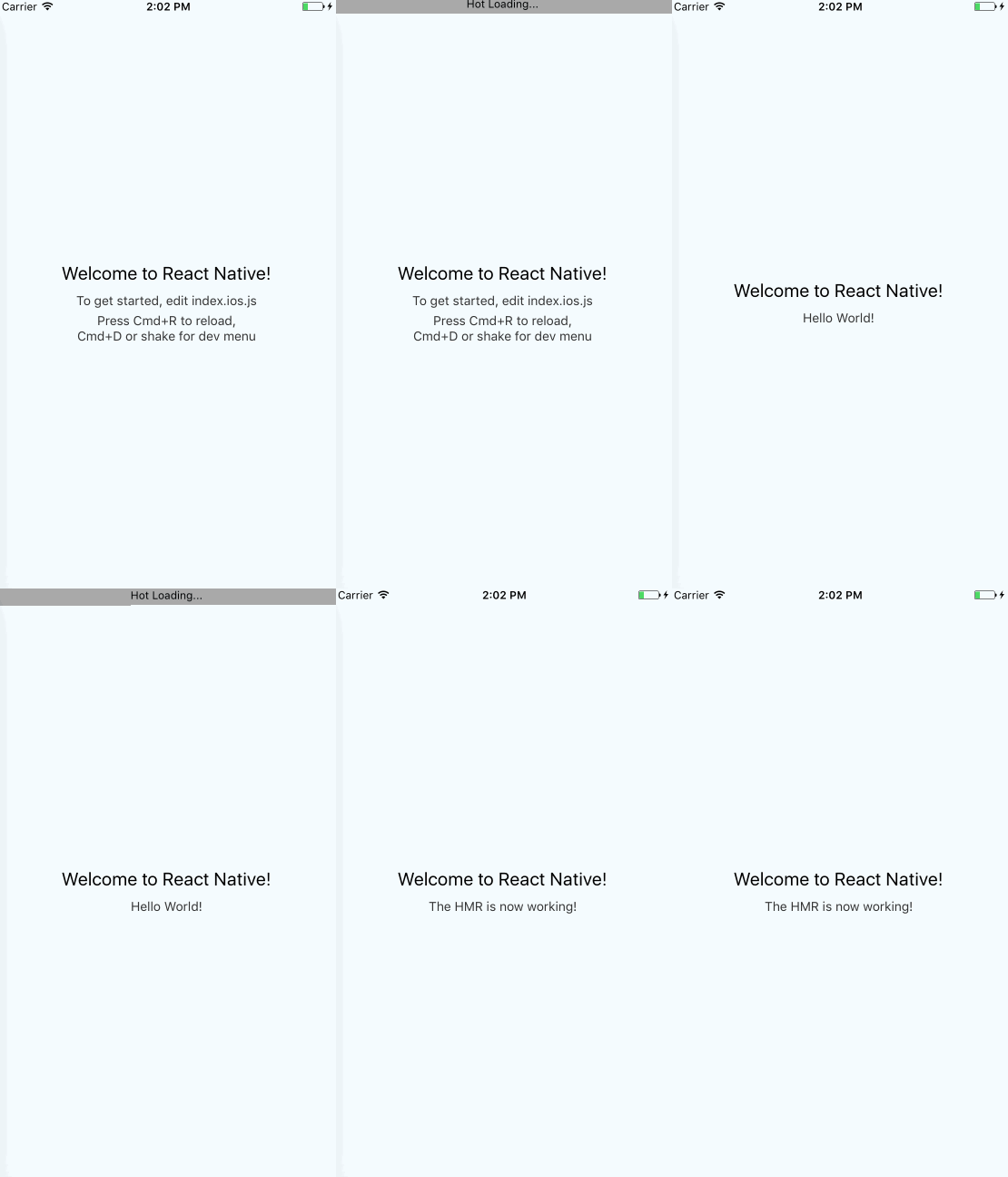
Getting the “Enable Hot Reloading” button in dev menu to work
In order to get this button to have any effect, we need to update the hot middleware.
When you tap Enable hot replacement, React Native app will connect to a WebSocket under path <rte-code>/hot<rte-code>, and will disconnect, if you disable hot replacement. So, the middleware should send hot events only when the native hot client is connected to that WebSocket. With this solution, the middleware can also send <rte-code>update-start<rte-code> and <rte-code>update-done<rte-code> events to a native hot client, so you will see notifications at the top of the screen.
Here's more info about how the middleware manage those WebSockets.
Final words
Haul HMR should work with any navigation library, which uses a root component factory (<rte-code>() => MyApp<rte-code>). We’ve tested it with react-navigation and react-native-navigation. You can find the detailed guides on how to setup HMR with those libraries at Callstack GitHub.
Want to give it a try? Check out the Linaria project. Don’t forget to star it!
We’re still actively working on it, so please report any issues you find. Pull requests are always welcome.


