Receiving a Live Stream With Amazon IVS in React Native

Authors
Szymon Rybczak
Software Developer
@
Callstack

I thought this would require a bunch of custom native code, custom solutions, and basically a bunch of work. But it turns out that some time ago amazon-ivs-react-native-player package got published, and it allows us to add streaming players in just a few lines of code. In this post, I will present how to use this library.

What is Amazon IVS?

But first things first. Let’s start by explaining what Amazon IVS is. It stands for “Interactive Video Service,” and it is a managed live streaming solution offered by Amazon Web Services (AWS). It allows developers to quickly set up live interactive video experiences in their own applications. Amazon IVS is essentially built in the same technology that powers Twitch, one of the world's leading live streaming platforms.

Project setup

I’ll present an example of how you can set up an app and use this library. You can check out the repo containing the whole example app which I’ll build.

To create a stream you will need IVS Channel details. Check how to do it in a guide on getting started with Amazon IVS. There’s also a broadcast stream available e.g. with this Vercel Guide.

You may also check a sample stream; it’s working at the time of writing this article.

For the sake of this article, I’ll create a simple app with React Native CLI:

1. First, we need to run npx react-native@latest init SampleApp to create an app

2. Then we need to run the app on Android or iOS, we can do that simply by running run-ios or run-android commands

screenshot with welcome to React Native

3. Now we need to add some UI; for this, we’ll use react-native-paper library which we maintain at Callstack. I created a simple DashboardScreen with one TextInput for passing URL and Button which will navigate to StreamScreen, which I will create next.

screenshot of DashboardScreen
DashboardScreen

4. In this step we need to implement navigation and add second screen StreamScreen, for navigation I used react-navigation library. StreamScreen will contain a stream player. You can check changes for this step in this PR: Pull Request #1.​

yarn add amazon-ivs-react-native-player
view raw snippet1.bash hosted with ❤ by GitHub

5. Then if we want to run app on iOS we need to install Pods, we can do it with:

npx pod-install

6. And finally to use this library we need to imports IVSPlayer, and pass the url to stream as streamUrl prop

import React from 'react';
import IVSPlayer from 'amazon-ivs-react-native-player';
const URL = 'https://website.com';
const StreamScreen = () => {
return <IVSPlayer streamUrl={URL} />;
}
export default StreamScreen;

Now finally we can test it, so here I’m passing a URL to the stream and IVSPlayer component correctly displays stream
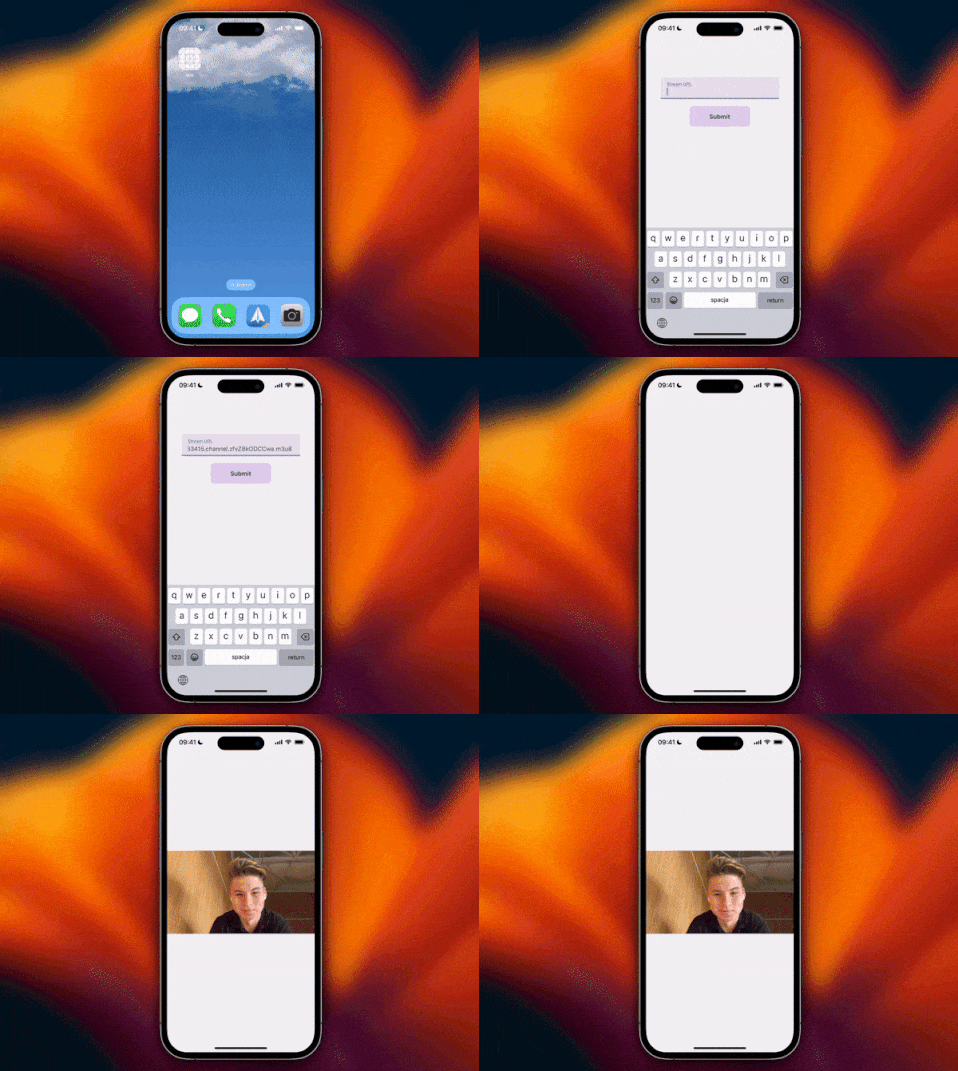
Thanks to the amazon-ivs-react-native-player package, you can set up a streaming player with just a few steps without any custom native code. You can also play with the example app that is inside the repository - it contains more complex usage and all props that you can use 🎉 Give it a try!

Insights

Learn more about TV

cover

Jun 11Article

AI-Assisted React Native Migration for TV: Lessons From Zattoo

A practical look at React Native TV migration, based on Zattoo’s experience with shared code, platform differences, and team change.

cover

Apr 27Webinar

From Native to React Native for TV: The Zattoo Case

Learn why and how Zattoo moved from native TV apps to React Native, what changed for their team, and what it takes to scale across multiple platforms efficiently.

cover

Nov 25Podcast

Amazon's Vega OS: A New OS With React Native Built-In

Giovanni Laquidara (Amazon) introduces Vega OS, a new lightweight operating system with React Native built-in, designed for high-performance on low-end media devices.

cover

Oct 3Article

Cross-Platform TV Apps With React Native for tvOS, Android TV, and Tizen

Learn why React Native is a powerful choice for TV app development. Discover how it unifies development for tvOS, Android TV, Tizen, and more with a single codebase.

cover

Oct 2Live Stream

Building React Native App for Vega OS

React 19.2 brings <Activity> and useEffectEvent, new ideas for React state management arrive, and Vega OS debuts as a React Native-powered Linux OS.

cover

May 29Talk

The Bigger Picture

React Native lessons from TV that scale: performance, architecture & cross-platform code strategies, beyond mobile, across devices.

cover

Mar 5Podcast

Multiple TV Platforms, One Codebase: React Native TV App Development

Is TV app development is the same as mobile, but bigger? It's not. In this episode, Michael Khirallah (DIRECTV) and Chris Trag (Amazon) will explain why.

cover

Dec 6Article

Developing a React Native TV App

Build React Native TV apps. Explore Expo and Bare React Native TV setups, add TV support to existing projects, and structure apps for multi-platform builds.

cover

Dec 13Podcast

React Native for TV App Development

Learn about the current state of the TV development space and the benefits and considerations of applying React Native to it.

cover

Feb 2Article

Amazon Fire TV Stick App in React Native

Use React Native to build an AF app. Explore more in our article! Contact us for React Native project assistance.

cover

Mar 19Tutorial

The Hard Way vs. The React Native AI SDK Way: Stop Writing Custom Modules for Every Model

Learn how React Native AI uses a unified provider model to switch between cloud and on-device LLMs without rewriting application logic, enabling reliable AI experiences online and offline.

cover

Mar 12Tutorial

Build Smarter Apps: Tool Calling & AI Orchestration Explained

Learn how on-device models in React Native can call tools, interact with external APIs, and return structured outputs you can use directly in application logic.

cover

Mar 5Tutorial

MLC LLM + React Native: On-Device AI Without the Pain

Learn how to run third-party on-device LLMs in React Native using MLC LLM. Choose your models, run them efficiently across platforms, and keep a unified JavaScript API with React Native AI.

cover

Feb 24Tutorial

Intelligent Fallbacks with Apple Intelligence in React Native

Learn how to use Apple’s built-in Foundation Models in React Native apps, reduce memory usage, and enable fast, fully on-device AI with React Native AI Apple.

cover

Feb 10Tutorial

What Is the React Native AI SDK? A Complete Intro & Quickstart

Learn why on-device AI matters for React Native apps, how local LLMs behave offline, and what problems React Native AI is designed to solve from day one.

cover

Jan 29Tutorial

Implementing an Android TurboModule with Kotlin

Learn how to implement a React Native TurboModule on Android, from the TypeScript spec and Codegen to the Kotlin implementation and package registration.

cover

Jan 19Tutorial

Working with Different Threads in Swift TurboModules

Learn how JavaScript, native module, background, and main threads interact in React Native TurboModules, and how to use GCD queues to run async work safely in Swift.

cover

Jan 9Tutorial

How to Add Type-Safe Constants to Swift TurboModules

Learn how to expose typed, immutable constants from a Swift TurboModule using Codegen, and get full end-to-end type safety between native and JavaScript.

cover

Dec 30Tutorial

Adding Event Emitters to Your TurboModule in Swift

Learn how to emit native events from a Swift TurboModule and subscribe to them in JavaScript, including proper memory management and Codegen integration.

cover

Dec 22Tutorial

Writing Your First TurboModule in Swift

Learn how to build a fully working TurboModule in Swift, integrate it with Codegen, and bridge it through Objective‑C inside an Expo app.