Simplify Your iOS Brownfield Integration With RootViewFactory

Authors
Oskar Kwaśniewski
Software Developer
@
Callstack

Many teams that have made native apps are starting to add React Native to their existing codebase. There are many reasons behind it - the most important being probably the ability to develop features with one code for multiple platforms.

However, to make the most of it, developers should aim at the latest React Native version possible to leverage the New Architecture. In terms of brownfield development, it might be a little bit tricky, though. Let’s see how to enable it in brownfield apps and what we can do to make it easier.

Enabling the New Architecture in a brownfield app

In general, when integrating React Native in an iOS native app, to turn it into a brownfield app you should use RCTRootView. It’s a UIView that holds a React Native root, providing the interface between the hosted app and the native side at the same time. Let’s say we have an RCTRootView in our brownfield app, and we initialize like this:

let jsCodeLocation = URL(string: "<http://localhost:8081/index.bundle?platform=ios>")!
let rootView = RCTRootView(bundleURL: jsCodeLocation, moduleName: "ReactNativeScreen", initialProperties: [:], launchOptions: nil)
let vc = UIViewController()
vc.view = rootView
self.present(vc, animated: true, completion: nil)

This RCTRootView initializer is intended to be used with the app as a single RCTRootView, and the bridge is created internally.

However, if you want to switch to the New Architecture in a brownfield app and use Fabric as a renderer, it takes a few more steps as you need to refactor the code on the app side. With Fabric enabled, you should move from RCTRootView to RCTFabricSurfaceHostingProxyRootView, or eventually use a proper renderer based on the RCT_NEW_ARCH_ENABLED flag. The setup is quite verbose; if you are interested in the details, you can take a look at the implementation of RCTRootViewFactory.

Thankfully, we don’t need to do any of this! Let’s go over the implementation.

Changes in AppDelegate

First step is subclassing your AppDelegate to RCTAppDelegate, which internally creates RCTRootViewFactory and sets up all the necessary parts to make React Native work.

Note: If you don't want to subclass RCTAppDelegate an alternative approach is being developed called ReactNativeFactory, which decouples RCTAppDelegate from the initialization flow.
import UIKit
import React
import React_RCTAppDelegate
class AppDelegate: RCTAppDelegate {
override func application(_ application: UIApplication, didFinishLaunchingWithOptions launchOptions: [UIApplication.LaunchOptionsKey : Any]? = nil) -> Bool {
// Do any setup your app needs
self.automaticallyLoadReactNativeWindow = false
// Remember to call super
return super.application(application, didFinishLaunchingWithOptions: launchOptions)
}
}

This sets up our AppDelegate to play nicely with React Native. Notice how we call self.automaticallyLoadReactNativeWindow = false this prevents RCTAppDelegate's applicationDidFinishLaunchingWithOptions method from initializing the default React Native window and a view controller.

On top of that we also need to inform React Native about the source of our JavaScript bundle. In order to do so, add those two methods do your AppDelegate:

import UIKit
import React
import React_RCTAppDelegate
class AppDelegate: RCTAppDelegate {
// ... application didFinishLaunchingWithOptions
override func sourceURL(for bridge: RCTBridge) -> URL? {
self.bundleURL()
}
override func bundleURL() -> URL? {
#if DEBUG
RCTBundleURLProvider.sharedSettings().jsBundleURL(forBundleRoot: "index")
#else
Bundle.main.url(forResource: "main", withExtension: "jsbundle")
#endif
}
}

Next step: Use RCTRootViewFactory to spawn new views when needed.

Example usage

As an example, let’s use a brownfield app written in SwiftUI (GitHub repository) and leverage React Native for one of the tabs using native TabView component.

First let's use the AppDelegate above in our SwiftUI App struct:

@main
struct BrownfieldSwiftUIApp: App {
@UIApplicationDelegateAdaptor var delegate: AppDelegate
var body: some Scene {
WindowGroup {
TabView {
ContentView()
.tabItem {
Label("Home", systemImage: "house")
}
// Add ReactNative as new tab here
}
}
}
}

In order to bridge React Native to SwiftUI let's use UIViewRepresentable to create a new React Native root view inside.

Below we create a new struct called ReactNativeView which accepts moduleName and rootViewFactory to create a new view.

struct ReactNativeView: UIViewRepresentable {
var moduleName: String
var rootViewFactory: RCTRootViewFactory
func makeUIView(context: Context) -> UIView {
return rootViewFactory.view(withModuleName: moduleName)
}
func updateUIView(_ uiView: UIView, context: Context) {
// noop
}
}

Module name is the parameter passed to AppRegistry.registerComponent function call on the JavaScript side.

Example:

AppRegistry.registerComponent('ReactNativeScreen', () => App)
view raw index.js hosted with ❤ by GitHub

Also if you want to pass some additional props to React Native view, you can invoke viewWithModuleName:initialProperties method and pass a dictionary:

rootViewFactory.view(withModuleName: moduleName, initialProperties: ["prop1": "test"])

On the JavaScript side you can use those props like this:

const ReactNativeScreen = ({ prop1 }) => // ...
view raw App.tsx hosted with ❤ by GitHub

Now let's drop in the ReactNativeView struct passing module name and rootViewFactory that we can retrieve from AppDelegate:

@main
struct BrownfieldSwiftUIApp: App {
@UIApplicationDelegateAdaptor var delegate: AppDelegate
var body: some Scene {
WindowGroup {
TabView {
ContentView()
.tabItem {
Label("Home", systemImage: "house")
}
ReactNativeView(
moduleName: "ReactNativeScreen",
rootViewFactory: delegate.rootViewFactory
)
.tabItem {
Label("Settings", systemImage: "gear")
}
}
}
}
}

Results

As a result we get clean integration of React Native into a native SwiftUI app, allowing us to gradually migrate to React Native for screens we need.

React Native window is loaded after the user visits this tab, keeping in mind resource management.
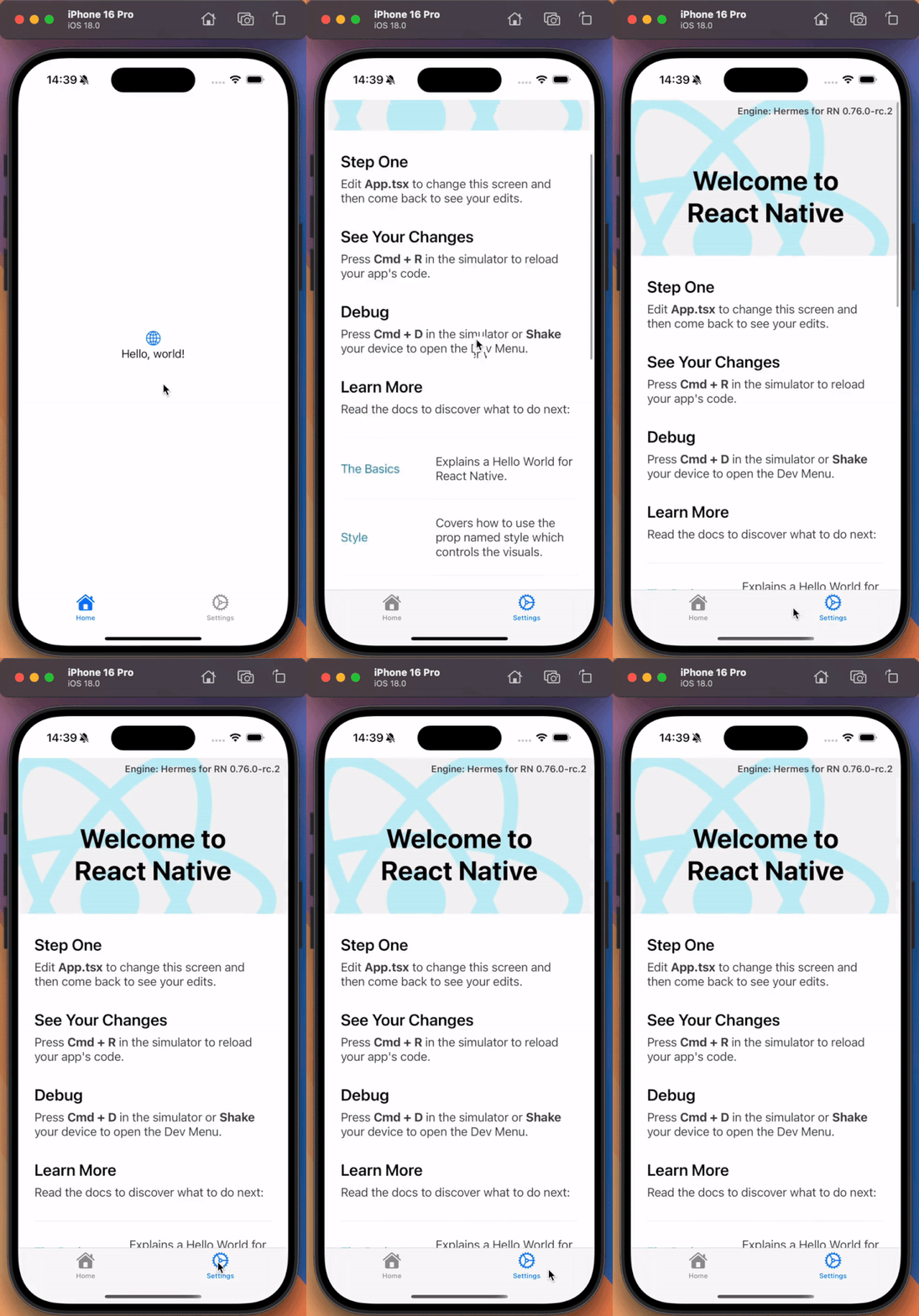
GIF showing integration of React Native into a native SwiftUI app

Conclusions

RootViewFactory API is a valuable tool that simplifies the process of integrating React Native with your existing iOS or macOS app. By adopting this pattern you can make your migration to the New Architecture easier and streamline the upgrading experience of React Native in your brownfield apps.

Insights

Learn more about Brownfield

cover

Aug 27Article

React Native in .NET MAUI: A Practical Brownfield Integration Guide

Learn how to embed React Native inside a .NET MAUI app with a brownfield setup. This guide covers runtime packaging, lifecycle wiring, navigation, and shared state across both runtimes.

cover

Aug 3Article

Migration to React Native in 2026 Starts With a Delivery Question

Choosing between brownfield and greenfield React Native migration? Learn where risk sits, when to use a checkpoint, and what to prove before committing.

cover

Jul 8Article

How we made Hybrid iOS apps compile 39% faster with React Native Brownfield

See how React Native Brownfield uses iOS prebuilts to cut packaging times by up to 39% for hybrid apps, with details on setup, internals, and benchmark results.

cover

Jun 18Article

How We Made the Brownfield Gradle Plugin 22% Faster

See how task-driven Gradle optimization made the Brownfield Gradle Plugin 22% faster for clean Android release builds.

cover

Jun 3Article

AI-Supported Brownfield Migration to React Native

See how AI-supported workflows cut brownfield React Native evaluation from weeks to days by speeding up setup, planning, implementation, and QA.

cover

May 18Article

Unlocking Expo Updates in an Isolated Brownfield Architecture with SDK 55

Learn how to enable Expo Updates in an Isolated Brownfield setup with Expo SDK 55, including iOS packaging, Android patching, and OTA testing.

cover

Apr 23Talk

State of Brownfield in React Native

A practical look at Brownfield React Native adoption in mature native apps, architecture, tooling, and real-world tradeoffs.

cover

Apr 2Webinar

AI-Assisted Migrations to React Native: From Months to Days

Reduce migration time from months to days by using AI in real React Native workflows. Learn when to migrate incrementally and when starting fresh is the better option.

cover

Nov 17Talk

Vega Developer Meetup

Learn how to integrate React Native into Android TV apps at the Vega Developer Meetup. Workshop, roadmap, and community talks, live in Munich.

cover

May 16Podcast

You Don’t Need a Rewrite, You Need React Native Brownfield

Discover how modern React Native Brownfield integration enables cross-platform power in native apps, without rewriting from scratch.

cover

Jan 13Podcast

Lessons from Shopify's Migration to React Native with Mustafa Ali

Learn how Shopify's migration to React Native led to 86% code unification, reduced build times, and seamless feature parity across platforms.

cover

Jun 14Podcast

Migration to React Native

The 13th episode of React Universe On Air (formerly known as The React Native Show) is fully focused on migrating from different technologies to React Native, the two most popular approaches to this process (greenfield and brownfield software development), and our state-of-the-art brownfield approach.

cover

Mar 19Tutorial

The Hard Way vs. The React Native AI SDK Way: Stop Writing Custom Modules for Every Model

Learn how React Native AI uses a unified provider model to switch between cloud and on-device LLMs without rewriting application logic, enabling reliable AI experiences online and offline.

cover

Mar 12Tutorial

Build Smarter Apps: Tool Calling & AI Orchestration Explained

Learn how on-device models in React Native can call tools, interact with external APIs, and return structured outputs you can use directly in application logic.

cover

Mar 5Tutorial

MLC LLM + React Native: On-Device AI Without the Pain

Learn how to run third-party on-device LLMs in React Native using MLC LLM. Choose your models, run them efficiently across platforms, and keep a unified JavaScript API with React Native AI.

cover

Feb 24Tutorial

Intelligent Fallbacks with Apple Intelligence in React Native

Learn how to use Apple’s built-in Foundation Models in React Native apps, reduce memory usage, and enable fast, fully on-device AI with React Native AI Apple.

cover

Feb 10Tutorial

What Is the React Native AI SDK? A Complete Intro & Quickstart

Learn why on-device AI matters for React Native apps, how local LLMs behave offline, and what problems React Native AI is designed to solve from day one.

cover

Jan 29Tutorial

Implementing an Android TurboModule with Kotlin

Learn how to implement a React Native TurboModule on Android, from the TypeScript spec and Codegen to the Kotlin implementation and package registration.

cover

Jan 19Tutorial

Working with Different Threads in Swift TurboModules

Learn how JavaScript, native module, background, and main threads interact in React Native TurboModules, and how to use GCD queues to run async work safely in Swift.

cover

Jan 9Tutorial

How to Add Type-Safe Constants to Swift TurboModules

Learn how to expose typed, immutable constants from a Swift TurboModule using Codegen, and get full end-to-end type safety between native and JavaScript.

cover

Dec 30Tutorial

Adding Event Emitters to Your TurboModule in Swift

Learn how to emit native events from a Swift TurboModule and subscribe to them in JavaScript, including proper memory management and Codegen integration.

cover

Dec 22Tutorial

Writing Your First TurboModule in Swift

Learn how to build a fully working TurboModule in Swift, integrate it with Codegen, and bridge it through Objective‑C inside an Expo app.