Introducing the OMH Cloud Storage Module

Authors
Diego Zuluaga
Director of Solutions
@
Futurewei

At the React Universe Conf 2024, the Open Mobile Hub (OMH), an open-source project under the Linux Foundation, launched a solution that will forever change how app developers integrate cloud storage services like Google Drive, Microsoft OneDrive, Dropbox, and more into Android and React Native apps. The OMH Cloud Storage Module introduces seamless SDK interoperability, enabling developers to manage cloud storage effortlessly across platforms.

It means no more juggling multiple SDKs or dealing with the complexities of service provider fragmentation. With a simple, unified interface, our module lets developers integrate cloud storage from multiple providers like Google Drive, OneDrive, and Dropbox seamlessly into React Native and Android apps.

Unified Storage for Modern Mobile Apps

We unveiled the OMH Cloud Storage Module, designed for app developers who want interoperability across various cloud service providers without the hassle of writing specific code for each. It supports Google Drive (both GMS and non-GMS devices), OneDrive, and Dropbox. Our module has been tested extensively on Android and iOS, ensuring stability for your app. For more details, you can watch the full talk on the React Universe Conf website.

Key Features:

A table showing key features of OMH cloud storage
Interoperability is the future of mobile app development, and we are bringing that vision to life with OMH. This cloud storage module ensures a seamless and reliable connection between multiple providers, giving developers the freedom to write once and deploy anywhere.

How to Get Started With OMH Cloud Storage Module

Getting started is easy, and at OMH we provide comprehensive documentation to guide developers through the process. Check out the Getting Started Guide.

Here’s a quick rundown of the steps you need to follow.

React Native Integration

  1. Install the necessary packages from npm or GitHub.
  2. Set up Google Authentication with appropriate scopes and client IDs.
  3. Integrate Google Drive storage using the unified OMH API.

Here’s a sample code snippet for React Native:

import GoogleAuthClient from '@openmobilehub/auth-google';
import { GoogleDriveStorageClient } from '@openmobilehub/storage-googledrive';
const scopes = [
'openid',
'profile',
'email',
'https://www.googleapis.com/auth/drive',
'https://www.googleapis.com/auth/drive.file',
];
// Initialize Google Auth Client
await GoogleAuthClient.initialize({
android: { scopes },
ios: {
scopes,
clientId: '<YOUR_GOOGLE_CLIENT_ID>',
redirectUrl: `com.googleusercontent.apps.${
'<YOUR_GOOGLE_CLIENT_ID>'.split('.')[0]
}:/oauth2redirect/google`,
},
});
// Set up Google Drive Storage Client
const googleDriveStorageClient = new GoogleDriveStorageClient(GoogleAuthClient);
// List files from Google Drive
const files = await googleDriveStorageClient.listFiles('rootFolderId');
console.log(files);
// Upload a local file to Google Drive
const uploadedFile = await googleDriveStorageClient.localFileUpload('localFilePath', 'rootFolderId');
console.log('File uploaded successfully:', uploadedFile);

Android Integration:

For Android, here’s the updated initialization and storage client setup, along with examples for listing files and uploading a file:

import com.openmobilehub.android.auth.core.OmhAuthProvider
import com.openmobilehub.android.storage.core.OmhStorageProvider
import com.openmobilehub.android.storage.googledrive.gms.GoogleDriveGmsConstants
import com.openmobilehub.android.storage.googledrive.nongms.GoogleDriveNonGmsConstants
// Initialize Google Auth Client for GMS and non-GMS
val omhAuthClient = OmhAuthProvider.Builder()
.addNonGmsPath("com.openmobilehub.android.auth.plugin.google.nongms.presentation.OmhAuthFactoryImpl")
.addGmsPath("com.openmobilehub.android.auth.plugin.google.gms.OmhAuthFactoryImpl")
.build()
.provideAuthClient(
context = context,
scopes = listOf(
"openid",
"email",
"profile",
"https://www.googleapis.com/auth/drive",
"https://www.googleapis.com/auth/drive.file"
),
clientId = "<YOUR_GOOGLE_CLIENT_ID>"
)
// Initialize Google Drive Storage Client for GMS and non-GMS
val omhStorageClient = OmhStorageProvider.Builder()
.addGmsPath(GoogleDriveGmsConstants.IMPLEMENTATION_PATH)
.addNonGmsPath(GoogleDriveNonGmsConstants.IMPLEMENTATION_PATH)
.build()
.provideStorageClient(omhAuthClient, context)
// List files from Google Drive
omhStorageClient.listFiles("rootFolderId") { files, error ->
if (error != null) {
Log.e("OMH Storage", "Error listing files", error)
} else {
Log.d("OMH Storage", "Files: $files")
}
}
// Upload a local file to Google Drive
omhStorageClient.localFileUpload("localFilePath", "rootFolderId") { file, error ->
if (error != null) {
Log.e("OMH Storage", "Error uploading file", error)
} else {
Log.d("OMH Storage", "File uploaded successfully: $file")
}
}

Try the Sample App

At OMH, we’ve built a sample app showcasing the module’s capabilities with Google Drive, OneDrive, and Dropbox integration. It demonstrates how your app can manage files and folders without requiring any modifications for each storage provider.

Explore the sample app and experience the simplicity of the OMH Cloud Storage Module.

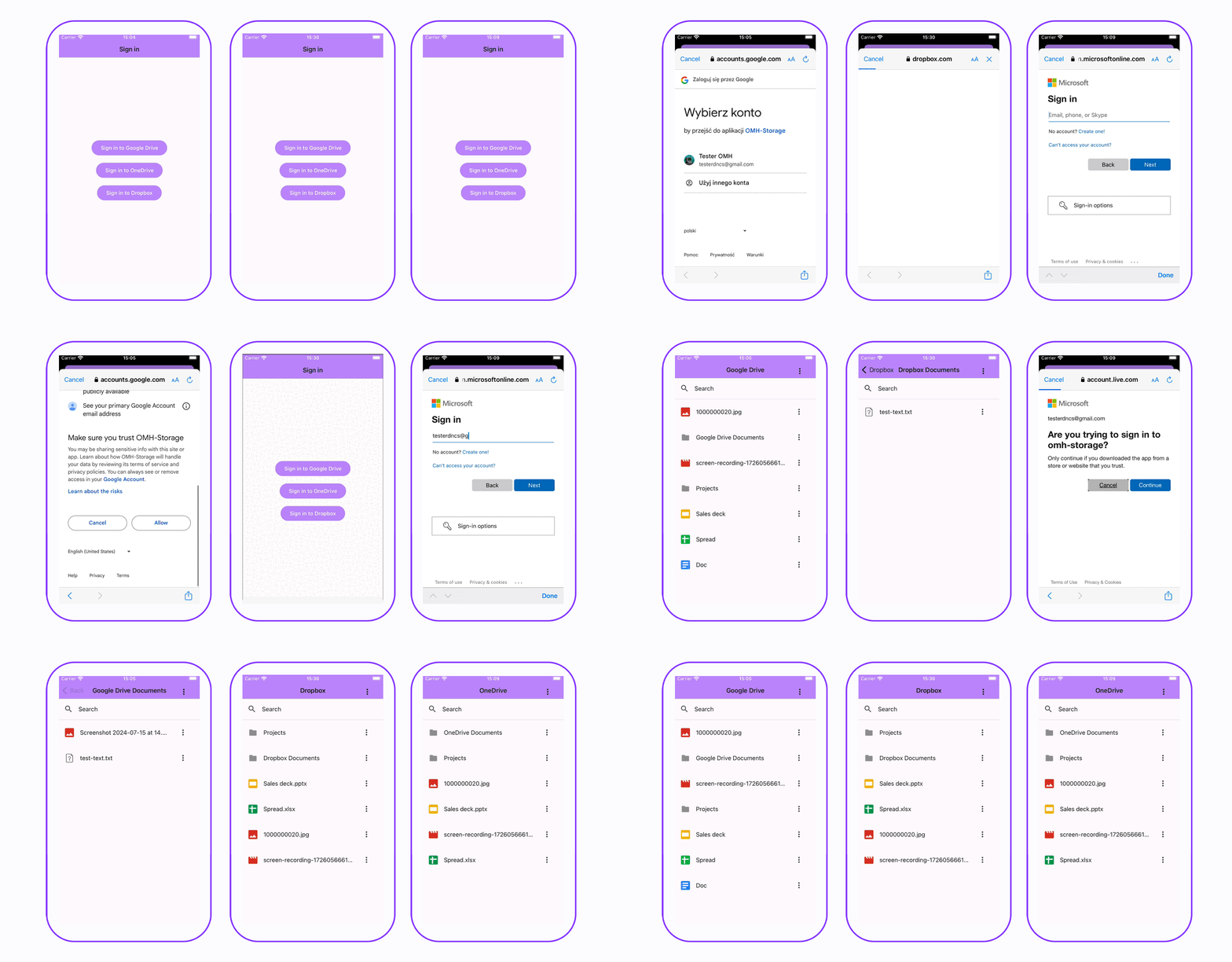
See a single codebase running seamlessly on any device

The following screenshots showcase multiple devices with Android, both with GMS and Non-GMS, and iOS. The same app works without changing a single line of code, supporting multiple map provider implementations (Google Drive, OneDrive, and Dropbox).
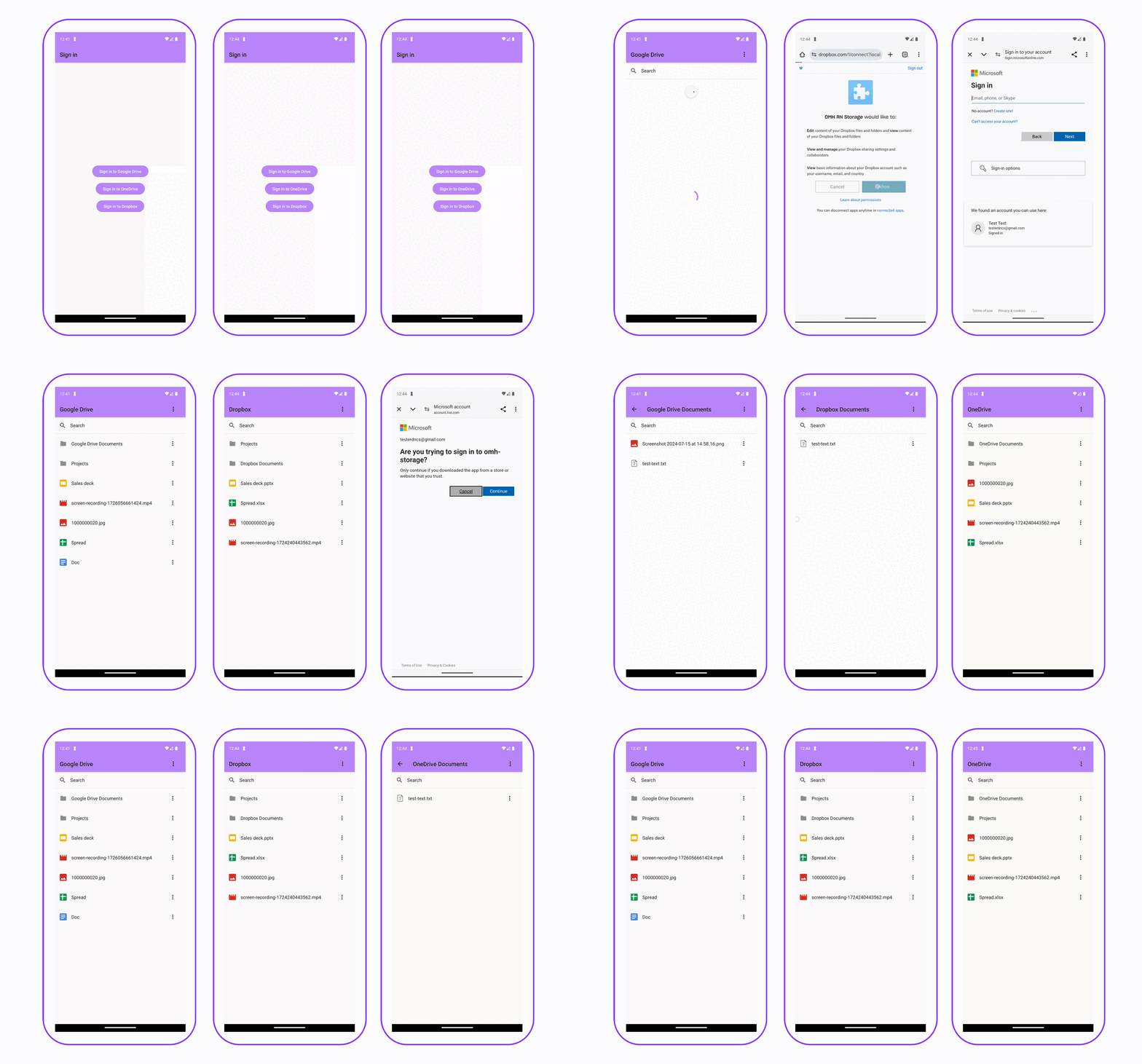
GIF showing a single codebase running seamlessly on Android
A single codebase running seamlessly on Android
GIF showing a single codebase running seamlessly on iOS
A single codebase running seamlessly on iOS

Create New Plugins

We're excited to invite developers to expand this module by adding new service providers. We’ve made it easy to implement new plugins, and our documentation includes step-by-step guides on how to get started.

Check out our contributing guide for more details.

Join the Community

We want to hear from you! Whether you're working on a garage project, experimenting with new features, or building enterprise-level solutions, we’re always eager to see how developers are using our tools. Got feedback? Have an exciting use case you’d like to share? Join the conversation on GitHub Discussions.

Let’s work together to solve cloud storage fragmentation once and for all.

Insights

Learn more about Open Source

cover

Aug 7Article

Visualizing Open Source Licenses to Analyze Compliance and Reduce Legal Risk

Discover how license-kit visualize maps and analyzes your dependency graph, helping you spot license issues, duplicates, and restrictive packages with interactive views, stats, and AI-powered summaries.

cover

Mar 26Podcast

How Definitely Typed Changed TypeScript Forever

Discover the story behind Definitely Typed with its creator, Boris Yankov, and learn how it became essential for type-safe JavaScript in the TypeScript ecosystem.

cover

Jul 12Article

Introduction to the React Native OMH Maps Library

Discover how the React Native OMH Maps library simplifies map integration with cross-platform compatibility, ease of use, and customization options.

cover

Apr 22Podcast

Behind the Scenes of React Native 0.74 Release

Join the release crew members to find out what new features and improvements React Native 0.74 brings to the cross-platform development world.

cover

Apr 27Podcast

Callstack OSS Update

April 2023 Callstack OSS Update: RFC for Expo Config Plugins, Re.Pack & Paper news.

cover

Dec 6Article

React Native Paper 5.0 - What’s New?

React Native Paper 5.0 is here! Dive into the latest updates and improvements.

cover

Feb 8Article

Stripe React Native: the Most Common Questions - Tipsi Migration Guide, Part 5

Check out the list of the most common questions about Stripe react Native Library prepared by Jakub Kłobus, software engineer at Callstack.

cover

Feb 6Article

Stripe React Native Migration Function by Function - Tipsi Migration Guide, Part 3

In the third part of the Tipsi Migration Guide we describe the Stripe React Native migration function by function.

cover

Dec 6Article

Stripe React Native Configuration - Tipsi Migration Guide, Part 2

In the second part of the Tipsi Migration Guide by Callstack, you'll learn how to properly configure the stripe-react-native library.

cover

Mar 19Tutorial

The Hard Way vs. The React Native AI SDK Way: Stop Writing Custom Modules for Every Model

Learn how React Native AI uses a unified provider model to switch between cloud and on-device LLMs without rewriting application logic, enabling reliable AI experiences online and offline.

cover

Mar 12Tutorial

Build Smarter Apps: Tool Calling & AI Orchestration Explained

Learn how on-device models in React Native can call tools, interact with external APIs, and return structured outputs you can use directly in application logic.

cover

Mar 5Tutorial

MLC LLM + React Native: On-Device AI Without the Pain

Learn how to run third-party on-device LLMs in React Native using MLC LLM. Choose your models, run them efficiently across platforms, and keep a unified JavaScript API with React Native AI.

cover

Feb 24Tutorial

Intelligent Fallbacks with Apple Intelligence in React Native

Learn how to use Apple’s built-in Foundation Models in React Native apps, reduce memory usage, and enable fast, fully on-device AI with React Native AI Apple.

cover

Feb 10Tutorial

What Is the React Native AI SDK? A Complete Intro & Quickstart

Learn why on-device AI matters for React Native apps, how local LLMs behave offline, and what problems React Native AI is designed to solve from day one.

cover

Jan 29Tutorial

Implementing an Android TurboModule with Kotlin

Learn how to implement a React Native TurboModule on Android, from the TypeScript spec and Codegen to the Kotlin implementation and package registration.

cover

Jan 19Tutorial

Working with Different Threads in Swift TurboModules

Learn how JavaScript, native module, background, and main threads interact in React Native TurboModules, and how to use GCD queues to run async work safely in Swift.

cover

Jan 9Tutorial

How to Add Type-Safe Constants to Swift TurboModules

Learn how to expose typed, immutable constants from a Swift TurboModule using Codegen, and get full end-to-end type safety between native and JavaScript.

cover

Dec 30Tutorial

Adding Event Emitters to Your TurboModule in Swift

Learn how to emit native events from a Swift TurboModule and subscribe to them in JavaScript, including proper memory management and Codegen integration.

cover

Dec 22Tutorial

Writing Your First TurboModule in Swift

Learn how to build a fully working TurboModule in Swift, integrate it with Codegen, and bridge it through Objective‑C inside an Expo app.