Make a React Hook out of Your Native Module

If you like to stay up to date with the latest trends in web development (or you’re React Native geek like me 😅), you probably heard something about React Hooks. They leverage the ability to write functional components by providing an ability to use state or life cycles without writing the class that is extending <rte-code>React.Component<rte-code>. If you want to learn more about them, make sure to read this ReactJS article.

The idea behind hooks sounds excellent, and it should clean up a lot of boilerplate from our React codebases. It’s not different when we are speaking about React Native apps — they heavily depend on React and encapsulates its patterns as well.

If you are the early adopter and tried to use hooks in React Native application some time ago, you could get disappointed by the fact that the newest releases of React Native don’t support this feature yet.

But lately, (as many other things in the universe) it has changed! The next release of React Native (0.59) supports React 16.8, and obviously hooks!

Functions like <rte-code>useState<rte-code> or <rte-code>useEffect<rte-code> are now in place, waiting for us to use them in our freshly written functional components. That’s great! But what if you want to write your custom hook? For example, you want to provide a cool way to consume your module in functional components. Be patient! You’ll learn that in the next few minutes.

Preparing the app

Let’s start with initializing the app. My app will be called NativeHookTester, but you can choose any name you want.

react-native init NativeHooksTester --version react-native@next
view raw gistfile1.txt hosted with ❤ by GitHub

NOTE: At the moment the next version is at 0.59.0-rc.2, but this tutorial should work with any RN ≥ 0.59.

While using classes in your modern React apps are perfectly fine, and you shouldn’t invest much time into refactoring existing codebases to functional components using hooks, in our case, I’d like to do that to consume our hook. Let’s change the following lines:

export default class App extends Component<Props> {
render() {
return (
<View style={styles.container}>
<Text style={styles.welcome}>Welcome to React Native!</Text>
<Text style={styles.instructions}>To get started, edit App.js</Text>
<Text style={styles.instructions}>{instructions}</Text>
</View>
);
}
}
view raw App.js hosted with ❤ by GitHub

into:

export default function App(props: Props) {
return (
<View style={styles.container}>
<Text style={styles.welcome}>Clipboard contents: {''}</Text>
<TextInput
style={styles.input}
onEndEditing={() => {}}
/>
</View>
)
}
view raw App.js hosted with ❤ by GitHub

Not only did we turn our class into the function, but also we played a bit with rendered content. Now instead of a welcome message, we have a fancy <TextInput /> ! 🤑

mobile screen with text input

NOTE: Remember to fix imports as well! If you wonder what’re the input styles: <rte-code>{width: 150, height: 30, backgroundColor: ‘white’, borderColor: ‘black’, borderWidth: 1}<rte-code>

Writing a custom hook for native module

Custom hooks for native modules aren’t different from any other hooks. You can use the same pattern to encapsulate communication with some service, database or any other action. Since it’s not an article on writing native modules, I’ll use something that is available with React Native. I chose Clipboard API, but you can write your ow native module following these articles on GitHub (iOS / Android).

Let’s start! 🚀 I created the file called <rte-code>useClipboard.js<rte-code>, I expect it to return the tuple that contains a value stored in the Clipboard, and a function to set the value in the Clipboard. It should look like this:

/* @flow */
import React from 'react';
export default function useClipboard() {
const contents = '';
const setClipboardContents = (content) => {
};
return [contents, setClipboardContents];
};
view raw useClipboard.js hosted with ❤ by GitHub

and our App() function should consume it in the following way:

export default function App(props: Props) {
const [clipboardContents, setClipboardContents] = useClipboard();
return (
<View style={styles.container}>
<Text style={styles.welcome}>Clipboard contents: {clipboardContents}</Text>
<TextInput
style={styles.input}
onEndEditing={({nativeEvent: {text}}) => setClipboardContents(text)}
/>
</View>
);
}
view raw App.js hosted with ❤ by GitHub

So far, so good, we need to move further and import a <rte-code>NativeModule<rte-code> called <rte-code>Clipboard<rte-code>. If you take a closer look at what’s available under that module, you’ll see that it contains two methods that could potentially fit our needs. The first one is called getString() and the second one setString(). To consume them we could write code like this:

It looks good, but it won’t work… 😢 I mean, technically it will, but not the way we want it to work. If we dig deeper into <rte-code>Clipboard<rte-code> code, we’ll discover that getString() function is <rte-code>async<rte-code> and we need an <rte-code>await<rte-code> statement to assign the value returned from promise to our <rte-code>contentsvariable<rte-code>.

But we don’t really want to make our hook an asynchronous function. We want to keep it as simple as possible, so ideally calling:

const [clipboardContents, setClipboardContents] = useClipboard();
view raw gistfile1.txt hosted with ❤ by GitHub

in App() function body should do the job. To achieve that we’ll need some state inside our hook. Guess what — we can use the state hook inside our hook! 🤯

Make a React Hook out of your Native Module meme

Consider the following code:

/* @flow */
import React, {useState, useEffect} from 'react';
import {NativeModules} from 'react-native';
export default function useClipboard() {
const [contents, setContents] = useState('');
const setClipboardContents = (content) => {
NativeModules.Clipboard.setString(content);
setContents(content);
};
return [contents, setClipboardContents];
};
view raw useClipboard.js hosted with ❤ by GitHub

Looks good, hmm? Now we can set value from our input to the clipboard. After that, we should be able to read its value from the state.
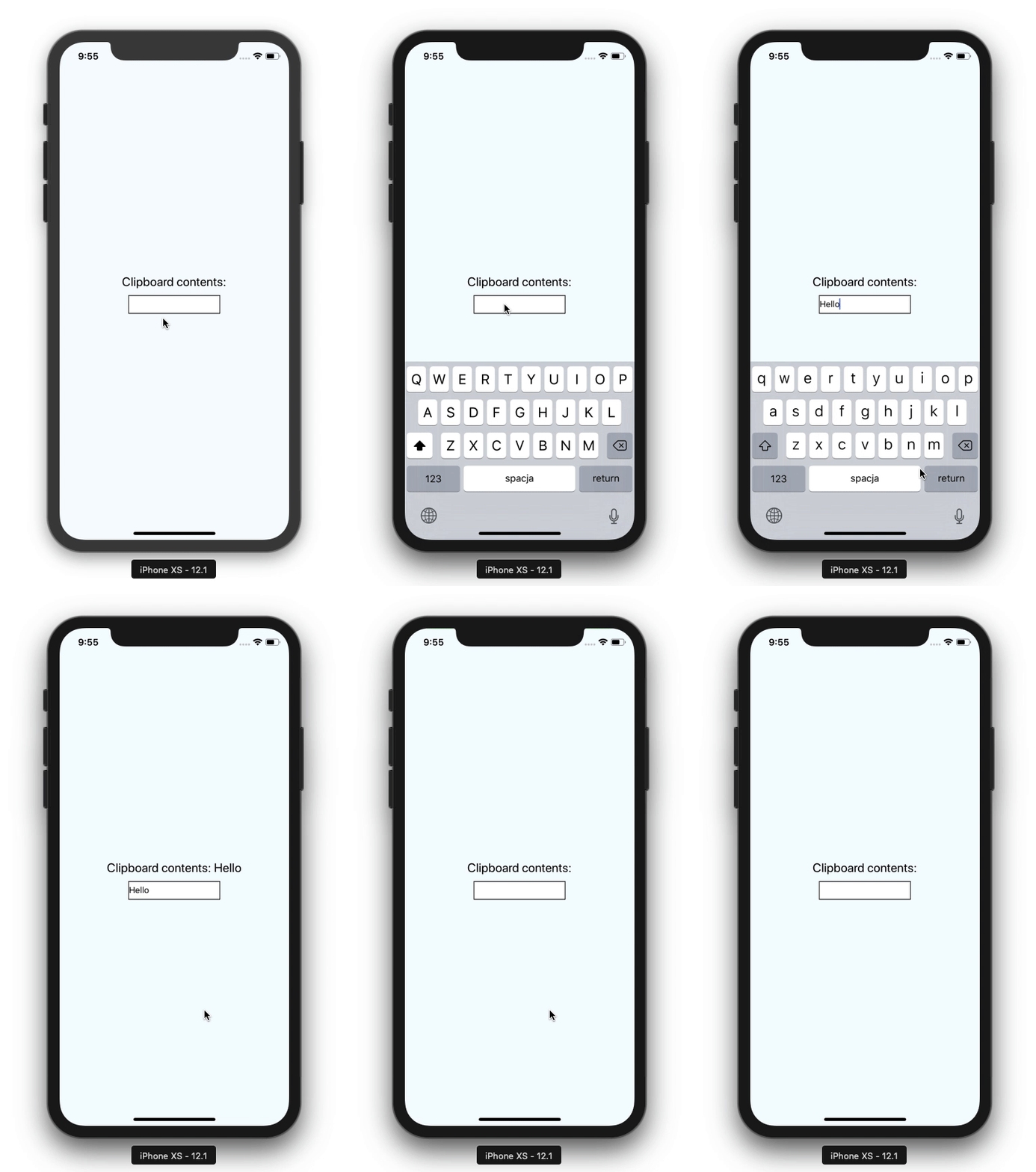
setting value from input to clipboard

But it’s not exactly what we want to do. As you can see after we refresh the app, we are not able to look at the contents of the clipboard. That’s because we are not precisely reading it. It sounds like it’s the time to deal with async stuff.

It turns out that our savior, in this case, will be no different. Asynchronous communication is some side effect, and yet another great hook will save us from oppression. This time we’ll use useEffect.

Currently <rte-code>clipboardContents<rte-code> is correctly filled with the data from <rte-code>Clipboard<rte-code>.
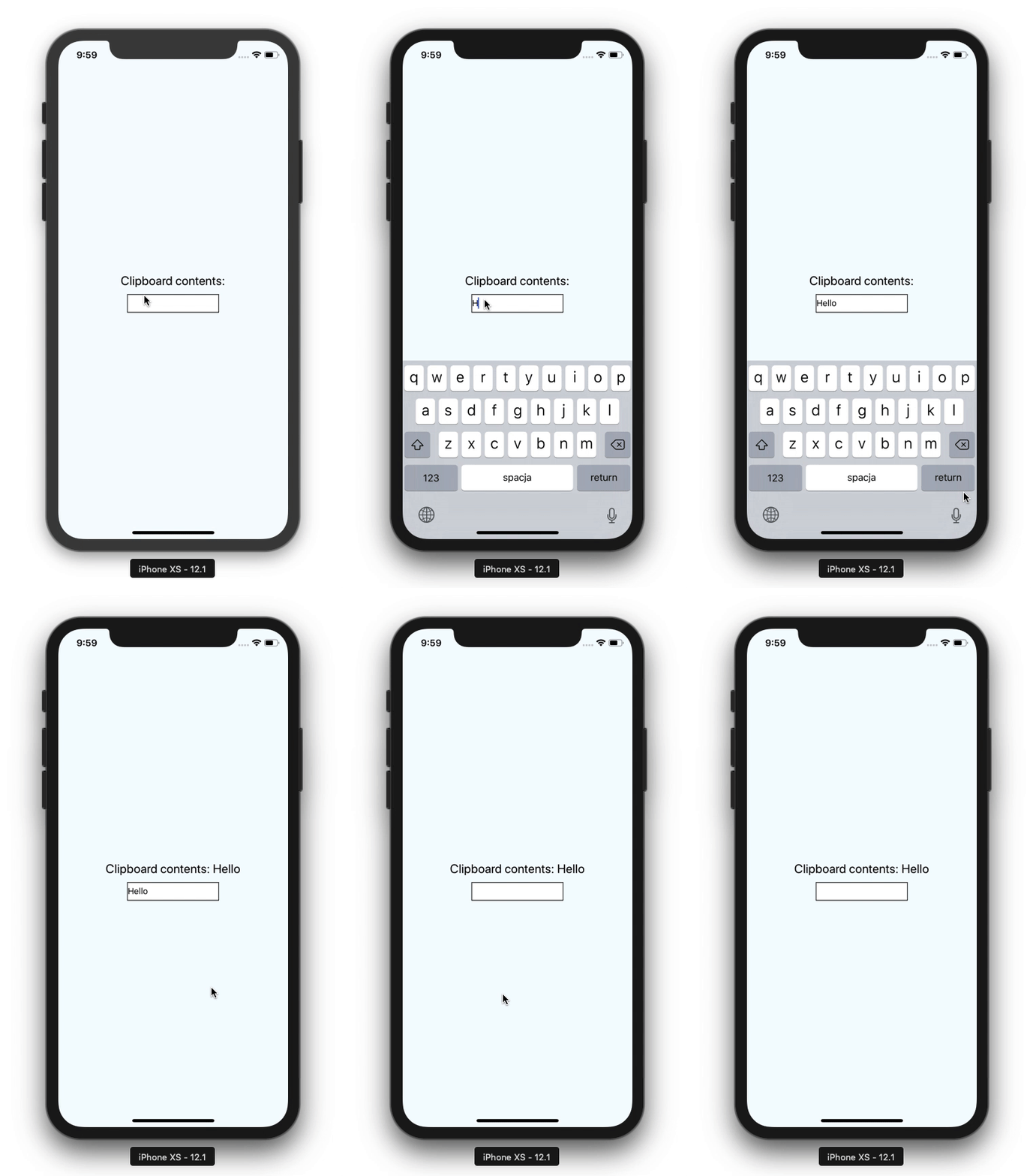
clipboard filled with data

That’s it! If you want to see the whole code, please check out this GitHub repo.

Insights

Learn more about React Native

cover

Aug 4Podcast

VisionCamera V5 With Marc Rousavy

Marc Rousavy joins Mike Grabowski to unpack VisionCamera v5, Nitro Modules, the constraints API, migration work, and what changed for React Native camera apps.

cover

Jul 1Podcast

Redraw for Effects Beyond Skia

William Candillon talks about where Redraw fits next to Skia, from physics-based rendering to camera effects, AR, and new UI patterns.

cover

Jun 29Article

Less Boilerplate, More Type Safety: React Navigation 8's Typed Hooks

React Navigation 8 improves typed hooks with screen-aware types, less boilerplate, and fewer unsafe casts in shared UI and nested navigators.

cover

Apr 30Live Stream

Build a React Native App With the TanStack Stack

Join Callstack’s live stream on building a React Native app from the ground up using the TanStack toolbelt.

cover

Apr 28Article

React Native production lessons from React Universe Meetup x Zalando

Lessons from React Universe Meetup x Zalando on React Native in production, covering brownfield performance, feed video, native API access, and on-device AI.

cover

Apr 23Talk

Shipping iOS Live Activities with React: The Voltra Story

How Voltra enables Live Activities and Dynamic Island views using React without writing Swift. A deep dive into iOS constraints and architecture.

cover

Apr 16Live Stream

React Native 0.85: Animation Backend and Key Updates

A recap of React Native 0.85, covering the new animation backend, DevTools improvements, and ecosystem takeaways.

cover

Mar 5Article

Keeping Screens Visible With <Activity mode="hidden">

A cross‑platform workaround to keep screens visible while <Activity mode="hidden"> unmounts effects on inactive screens by setting mode="hidden".

cover

Feb 25Article

React Native Monorepo With pnpm Workspaces

Set up a React Native monorepo with pnpm workspaces for mobile and Next.js web, including Metro fixes, hoisted node-linker, and shared packages.

cover

Feb 18Article

A Practical Guide to React Native Monorepo With Yarn Workspaces

Learn how to set up a React Native monorepo with Yarn workspaces for mobile and web, including Metro, Gradle, and shared packages.

cover

Feb 17Podcast

From Teddy Bears to Voice Agents: Kraen Hansen on Voice AI, Local-First & App Security

What happens when you combine voice agents and teddy bears? A hands-on look at local-first systems, voice AI, and security lessons from poking real apps.

cover

Jan 28Article

Bringing CSS Clipping to React Native

A deep look at how a single CSS feature moves through React Native’s New Architecture, from JavaScript styles to native rendering on iOS and Android.

cover

Mar 19Tutorial

The Hard Way vs. The React Native AI SDK Way: Stop Writing Custom Modules for Every Model

Learn how React Native AI uses a unified provider model to switch between cloud and on-device LLMs without rewriting application logic, enabling reliable AI experiences online and offline.

cover

Mar 12Tutorial

Build Smarter Apps: Tool Calling & AI Orchestration Explained

Learn how on-device models in React Native can call tools, interact with external APIs, and return structured outputs you can use directly in application logic.

cover

Mar 5Tutorial

MLC LLM + React Native: On-Device AI Without the Pain

Learn how to run third-party on-device LLMs in React Native using MLC LLM. Choose your models, run them efficiently across platforms, and keep a unified JavaScript API with React Native AI.

cover

Feb 24Tutorial

Intelligent Fallbacks with Apple Intelligence in React Native

Learn how to use Apple’s built-in Foundation Models in React Native apps, reduce memory usage, and enable fast, fully on-device AI with React Native AI Apple.

cover

Feb 10Tutorial

What Is the React Native AI SDK? A Complete Intro & Quickstart

Learn why on-device AI matters for React Native apps, how local LLMs behave offline, and what problems React Native AI is designed to solve from day one.

cover

Jan 29Tutorial

Implementing an Android TurboModule with Kotlin

Learn how to implement a React Native TurboModule on Android, from the TypeScript spec and Codegen to the Kotlin implementation and package registration.

cover

Jan 19Tutorial

Working with Different Threads in Swift TurboModules

Learn how JavaScript, native module, background, and main threads interact in React Native TurboModules, and how to use GCD queues to run async work safely in Swift.

cover

Jan 9Tutorial

How to Add Type-Safe Constants to Swift TurboModules

Learn how to expose typed, immutable constants from a Swift TurboModule using Codegen, and get full end-to-end type safety between native and JavaScript.

cover

Dec 30Tutorial

Adding Event Emitters to Your TurboModule in Swift

Learn how to emit native events from a Swift TurboModule and subscribe to them in JavaScript, including proper memory management and Codegen integration.

cover

Dec 22Tutorial

Writing Your First TurboModule in Swift

Learn how to build a fully working TurboModule in Swift, integrate it with Codegen, and bridge it through Objective‑C inside an Expo app.