Performant and Cross-Platform Shimmers in React Native Apps

Every React Native developer has been there: you need a loading indicator, but <ActivityIndicator /> feels dated, and building a good shimmer from scratch is a hassle.

Today, we're excited to introduce react-native-fast-shimmer, our open-source answer to this common problem. It's a lightweight, performant, and fully customizable library for creating elegant loading skeletons in any React Native app.

You can start using it today by installing the package from npm:

npm install react-native-fast-shimmer

It's designed to be the go-to solution for developers who need a quick, reliable, and beautiful placeholder effect. In this post, we'll dive into the thinking behind the library, its technical architecture, and how you can use it to elevate your app's user experience.

What are shimmers?

If you've used a modern app, you've seen a shimmer effect. Shimmers are the smooth, animated gradients that glide across UI elements, indicating that content is being fetched from a server. In any data-driven application, network latency is a reality. Shimmers provide an elegant way to manage that waiting period.

While spinners were the traditional choice for loading indicators, shimmers offer a superior user experience.

Here's why they've become the standard:

  • UI skeleton: Shimmers are typically applied to placeholder shapes that mimic the final layout. This "UI skeleton" prepares the user for the content that will appear, preventing jarring layout shifts when the data finally loads.
  • Visual cohesion: When multiple components on a screen load data independently, displaying several spinners can look cluttered. Synchronized shimmers create a more polished and cohesive visual experience.

The challenge with existing shimmer solutions

While the concept is simple, the implementation often isn’t. Over time, we’ve seen a number of shimmer libraries for React Native, but many fall short in key areas:

  • Heavy on 3rd-party dependencies
  • Limited customization
  • Poor performance on lower-end devices
  • Unpolished design

That’s why we decided to build something better: leaner, more performant, and built with modern React Native apps in mind.

Introducing react-native-fast-shimmer

Our approach to building react-native-fast-shimmer was guided by three core principles:

  • Platform accessibility: Work across the React Native ecosystem, including projects using Expo.
  • Performance: Ensure buttery-smooth animations with minimal impact on application performance.
  • Customization: Provide developers with the tools to tailor the effect to their needs.

The library achieves these goals by building on a minimal, yet powerful, foundation.

We use react-native-svg to create responsive linear gradients that automatically conform to any container shape. This means you can drop a shimmer into any view without worrying about manual styling.

For animation, we leverage react-native-reanimated to drive the effect off the UI thread, ensuring it remains fluid and responsive.

Rendering multiple shimmers at the same time provides stable performance results

In terms of performance, the architecture is highly optimized. No matter how many shimmer components are on-screen, all of them are driven by a single shared animated value. The animation logic is also automatically cleaned up when the shimmers are no longer visible, preventing memory leaks.

Getting started

Integrating react-native-fast-shimmer is straightforward.

After setting up react-native-reanimated in your project, you just need to wrap your application with the ShimmerProvider. This provider exposes the shared animation value to all Shimmer components and allows for global customization.

<ShimmerProvider duration={1000}>
	<View>
     <Shimmer />
  </View>
</ShimmerProvider>

Once the provider is in place, you can add a <Shimmer /> component anywhere in your component tree. It will automatically fill its parent container and synchronize its animation with all other active shimmers.
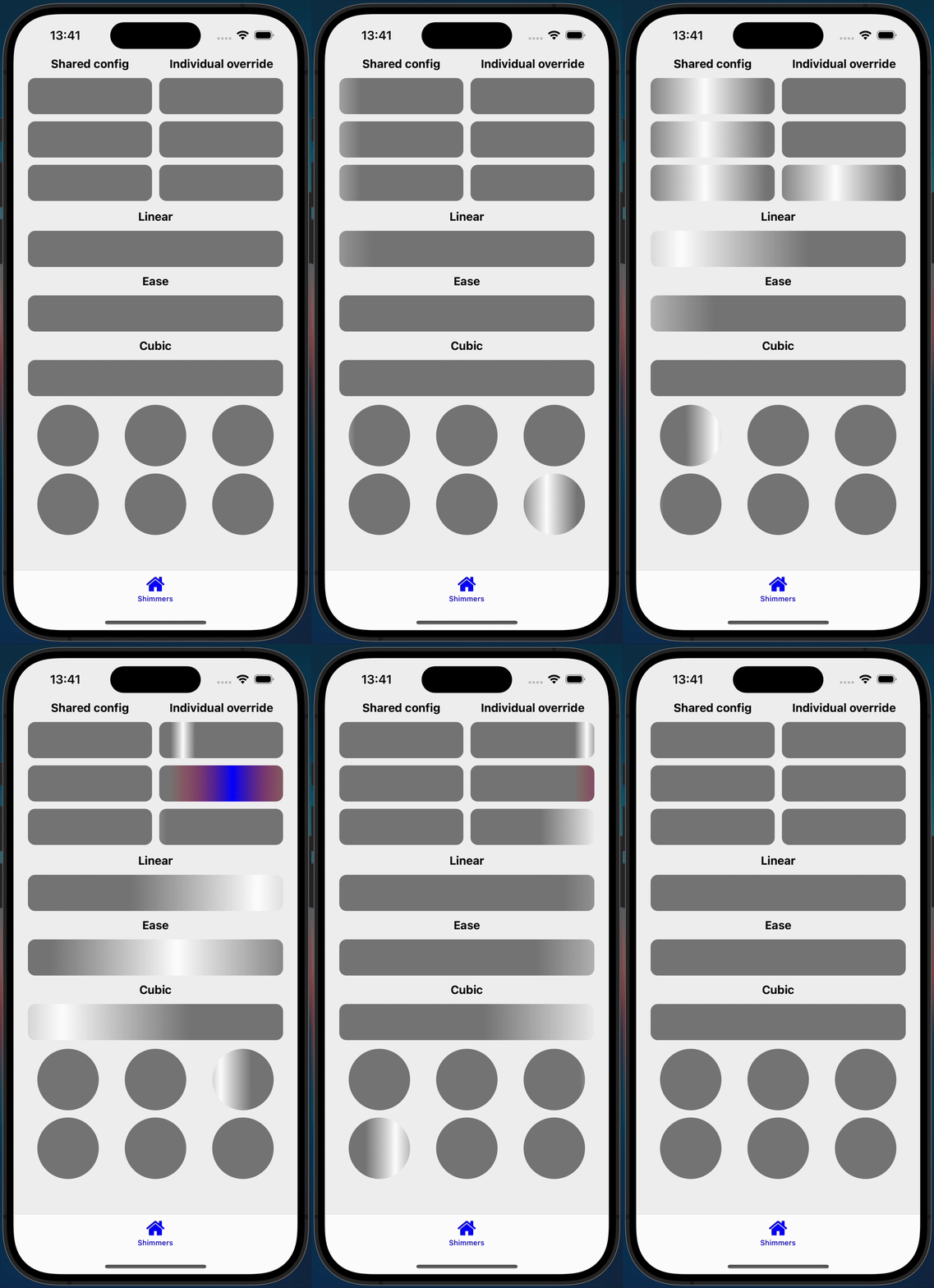
An example of multiple shimmers with different settings

What’s next?

The future of react-native-fast-shimmer depends on the community's feedback! The goal is to create the definitive, easy-to-use placeholder library for the entire React Native ecosystem.

The current math-based animation system opens the door to powerful new features. The roadmap includes more advanced customization options like:

  • Rotated and directional shimmers
  • Locally controlled animation timing
  • "Glimmer" effects (pulsating opacity animations)

If your project needs a fast, flexible, and beautiful shimmer solution, check out react-native-fast-shimmer on GitHub. We welcome your contributions and feedback to make it the best it can be.

Insights

Learn more about React Native

cover

Aug 4Podcast

VisionCamera V5 With Marc Rousavy

Marc Rousavy joins Mike Grabowski to unpack VisionCamera v5, Nitro Modules, the constraints API, migration work, and what changed for React Native camera apps.

cover

Jul 1Podcast

Redraw for Effects Beyond Skia

William Candillon talks about where Redraw fits next to Skia, from physics-based rendering to camera effects, AR, and new UI patterns.

cover

Jun 29Article

Less Boilerplate, More Type Safety: React Navigation 8's Typed Hooks

React Navigation 8 improves typed hooks with screen-aware types, less boilerplate, and fewer unsafe casts in shared UI and nested navigators.

cover

Apr 30Live Stream

Build a React Native App With the TanStack Stack

Join Callstack’s live stream on building a React Native app from the ground up using the TanStack toolbelt.

cover

Apr 28Article

React Native production lessons from React Universe Meetup x Zalando

Lessons from React Universe Meetup x Zalando on React Native in production, covering brownfield performance, feed video, native API access, and on-device AI.

cover

Apr 23Talk

Shipping iOS Live Activities with React: The Voltra Story

How Voltra enables Live Activities and Dynamic Island views using React without writing Swift. A deep dive into iOS constraints and architecture.

cover

Apr 16Live Stream

React Native 0.85: Animation Backend and Key Updates

A recap of React Native 0.85, covering the new animation backend, DevTools improvements, and ecosystem takeaways.

cover

Mar 5Article

Keeping Screens Visible With <Activity mode="hidden">

A cross‑platform workaround to keep screens visible while <Activity mode="hidden"> unmounts effects on inactive screens by setting mode="hidden".

cover

Feb 25Article

React Native Monorepo With pnpm Workspaces

Set up a React Native monorepo with pnpm workspaces for mobile and Next.js web, including Metro fixes, hoisted node-linker, and shared packages.

cover

Feb 18Article

A Practical Guide to React Native Monorepo With Yarn Workspaces

Learn how to set up a React Native monorepo with Yarn workspaces for mobile and web, including Metro, Gradle, and shared packages.

cover

Feb 17Podcast

From Teddy Bears to Voice Agents: Kraen Hansen on Voice AI, Local-First & App Security

What happens when you combine voice agents and teddy bears? A hands-on look at local-first systems, voice AI, and security lessons from poking real apps.

cover

Jan 28Article

Bringing CSS Clipping to React Native

A deep look at how a single CSS feature moves through React Native’s New Architecture, from JavaScript styles to native rendering on iOS and Android.

cover

Mar 19Tutorial

The Hard Way vs. The React Native AI SDK Way: Stop Writing Custom Modules for Every Model

Learn how React Native AI uses a unified provider model to switch between cloud and on-device LLMs without rewriting application logic, enabling reliable AI experiences online and offline.

cover

Mar 12Tutorial

Build Smarter Apps: Tool Calling & AI Orchestration Explained

Learn how on-device models in React Native can call tools, interact with external APIs, and return structured outputs you can use directly in application logic.

cover

Mar 5Tutorial

MLC LLM + React Native: On-Device AI Without the Pain

Learn how to run third-party on-device LLMs in React Native using MLC LLM. Choose your models, run them efficiently across platforms, and keep a unified JavaScript API with React Native AI.

cover

Feb 24Tutorial

Intelligent Fallbacks with Apple Intelligence in React Native

Learn how to use Apple’s built-in Foundation Models in React Native apps, reduce memory usage, and enable fast, fully on-device AI with React Native AI Apple.

cover

Feb 10Tutorial

What Is the React Native AI SDK? A Complete Intro & Quickstart

Learn why on-device AI matters for React Native apps, how local LLMs behave offline, and what problems React Native AI is designed to solve from day one.

cover

Jan 29Tutorial

Implementing an Android TurboModule with Kotlin

Learn how to implement a React Native TurboModule on Android, from the TypeScript spec and Codegen to the Kotlin implementation and package registration.

cover

Jan 19Tutorial

Working with Different Threads in Swift TurboModules

Learn how JavaScript, native module, background, and main threads interact in React Native TurboModules, and how to use GCD queues to run async work safely in Swift.

cover

Jan 9Tutorial

How to Add Type-Safe Constants to Swift TurboModules

Learn how to expose typed, immutable constants from a Swift TurboModule using Codegen, and get full end-to-end type safety between native and JavaScript.

cover

Dec 30Tutorial

Adding Event Emitters to Your TurboModule in Swift

Learn how to emit native events from a Swift TurboModule and subscribe to them in JavaScript, including proper memory management and Codegen integration.

cover

Dec 22Tutorial

Writing Your First TurboModule in Swift

Learn how to build a fully working TurboModule in Swift, integrate it with Codegen, and bridge it through Objective‑C inside an Expo app.