Testing a React App With Cypress

Authors
Adam Trzciński
Software Engineer
@
Callstack

Two weeks ago, Cypress was open-sourced and made available to everyone.

Cypress is open source and publicly available today! No more invite needed. 🎉 https://t.co/QUdmTZhpNS

— Cypress.io (@Cypress_io) October 10, 2017

Cypress is a tool, that (allegedly) lets you write your end to end tests faster, and with minimum to none setup.

Fast, easy and reliable testing for anything that runs in a browser.

Let’s give it a try and verify if that’s true!

We will integrate Cypress with one of our projects — Eedi. Eedi is a fantastic educational platform for UK teachers, students and their parents. It is crucial, that anyone who uses it, have nice and smooth experience while browsing, and that all works as expected.

Cypress setup

Inside our application root folder, let’s add Cypress as a dev dependecy:

<rte-code>$ yarn add --dev cypress<rte-code>

Adjust the <rte-code>"scripts"<rte-code> entry in <rte-code>package.json<rte-code>:

"scripts": {
...
"cypress:open": "cypress open"
}
view raw cypress.js hosted with ❤ by GitHub

Run your server locally, just like when normally developing, and then, in new terminal window lets open Cypress:

<rte-code>$ yarn run cypress:open<rte-code>

yarn run cypress

After a while, Cypress should open and we should see a window pop up.

Here we have access to all our tests, there’s even one provided out of the box!

Cypress have created new directory <rte-code>cypress<rte-code> with subfolders <rte-code>fixtures<rte-code>, integration and <rte-code>support<rte-code>. It also added empty <rte-code>cypress.json<rte-code> config file.

Since we will be accessing our root path often, it’s a good practice to abstract it to settings file. Open <rte-code>cypress.json<rte-code> file, and add an new entry with key <rte-code>baseUrl<rte-code> and url as a value:

{
"baseUrl": "http://localhost:3000"
}
view raw baseurl.js hosted with ❤ by GitHub

‍In the <rte-code>example_spec.js<rte-code> file we can see ‘Kitchen Sink Tests’ that can come in handy when we want to browse some common testing scenarios. But let us write our own tests for now.

Testing sign-in

Signing in is one of most important features of any app. If it’s done poorly, users won’t be able to see the rest of our work, and there’s no point in doing anything else.

Create a new file <rte-code>login_spec.js<rte-code>. Here we will test all our logic regarding signing in.

Let’s go, and write our first test — let’s check if happy path is working as expected:

describe('Log In', () => {
it('succesfully performs login action', () => {
// visit 'baseUrl'
cy.visit('/');
// assert if we are in good place - search for a 'smarter world phrase
cy.contains('smarter world');
// search for a div with 'Teachers' caption, and click it
cy.get('a[data-testid="main-link-teachers"]').click();
// check if url have changed
cy.url().should('includes', 'teachers');
cy.contains('more time to teach');
// get Login button and click it
cy.get('button[data-testid="menu-button-login"]').click();
// check if url have changed
cy.url().should('includes', '/login');
// submit inputs and click submit button
cy.get('input[data-testid="login-form-username"]').type('test@email.com');
cy.get('input[data-testid="login-form-password"]').type('password');
cy.get('button[data-testid="login-form-submit"]').click();
// verify that we were redirected
cy.url({ timeout: 3000 }).should('includes', '/c/');
});
});

Now, go to Cypress app and select test that we’ve just created. It should run all tests in a file, and we can watch how they perform:
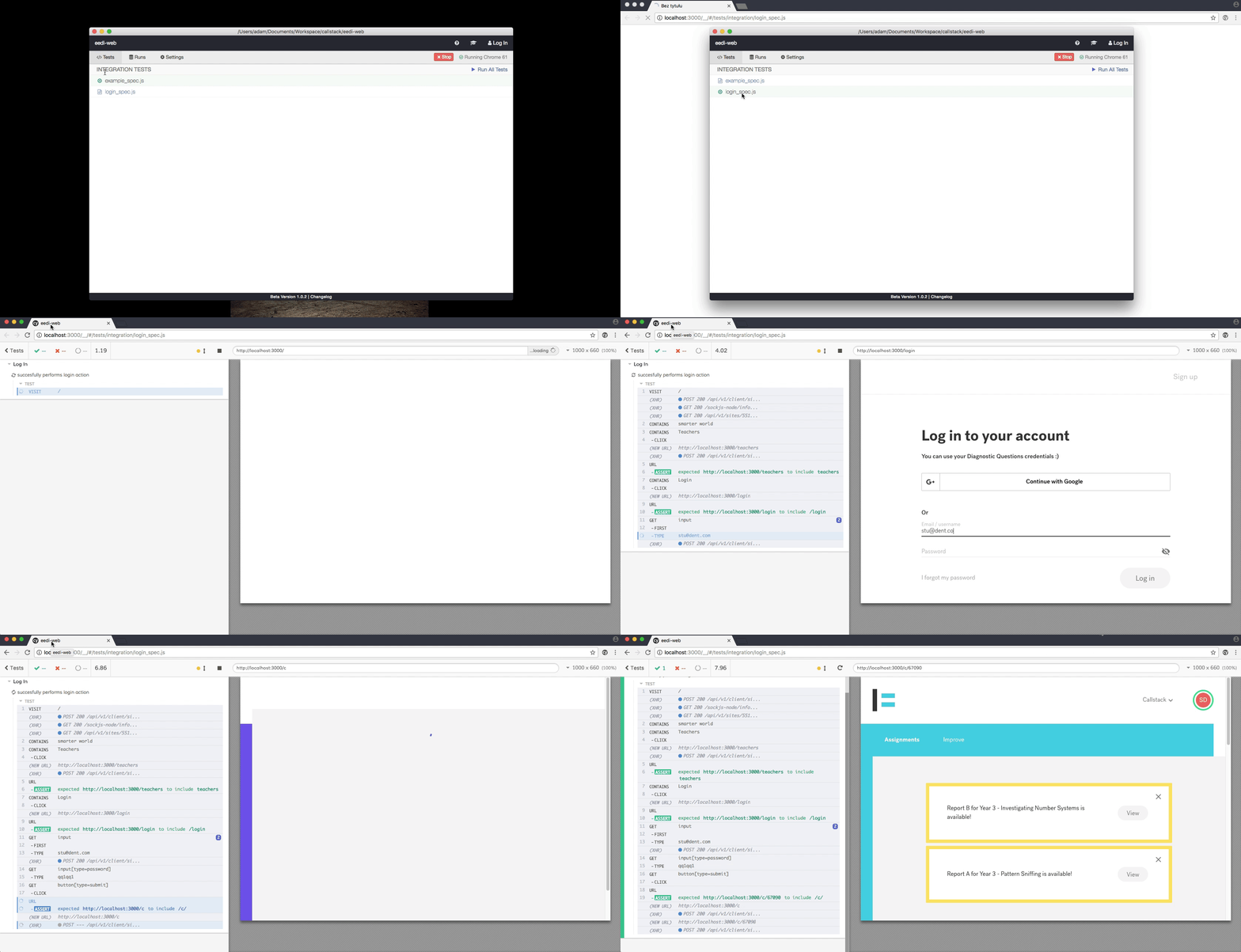
gif showing how it performs with cypress

At the left pane of test runner, we can see all actions performed by Cypress, elements found and redirects made by browser. We can also use nice time travel feature and inspect every single step of our tests.

Let’s break something! Change line 12 of the test:
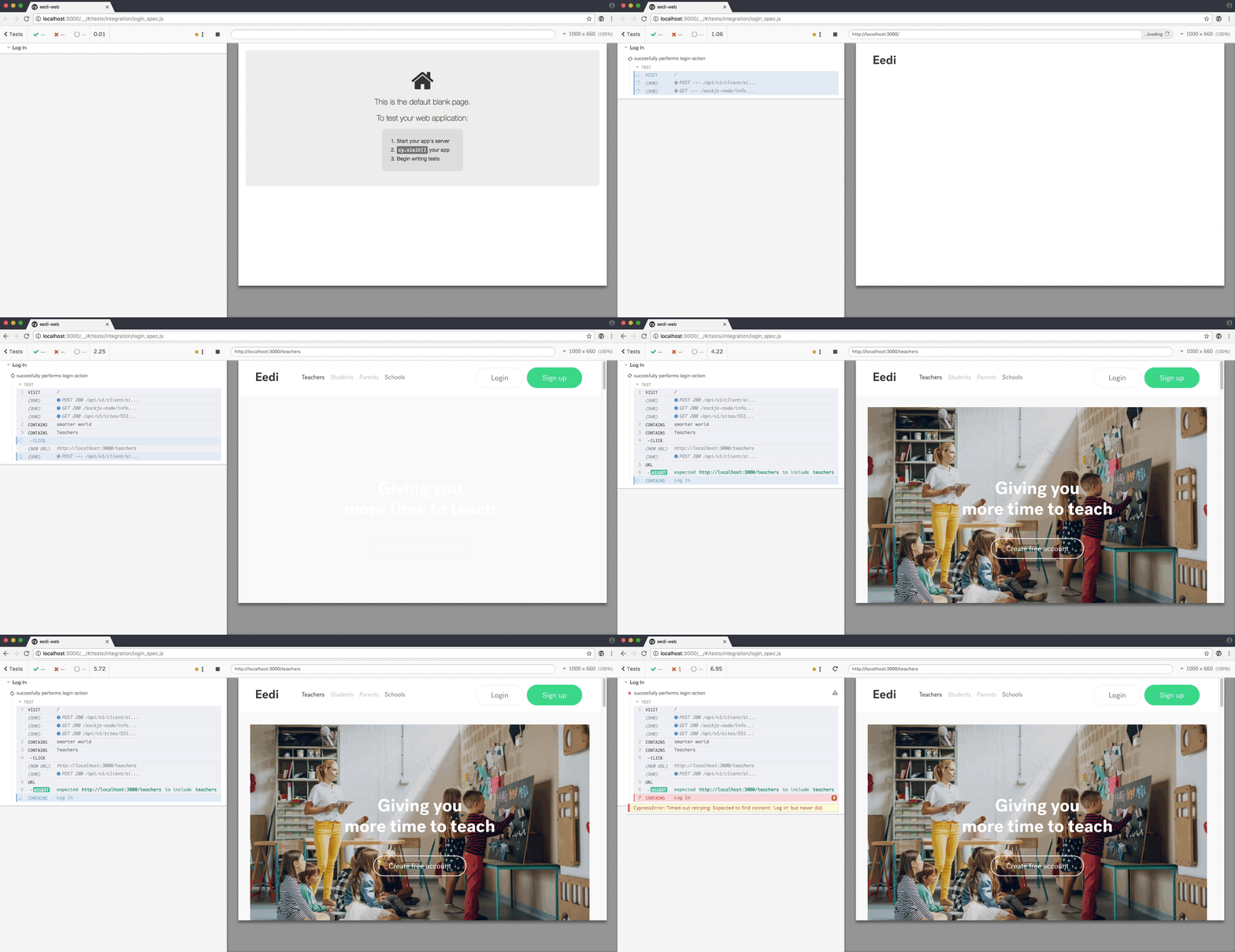
cy.contains('Log In').click()
view raw cy_contains.js hosted with ❤ by GitHub
failing test

It fails. And that’s good, we have established that happy path is indeed happy. Cypress provides us with detailed stack trace — what went wrong and where it happened.

Add some more cases:

  • unsuccessful log-in action should yield error message, and
  • unauthorized user should not be able to visit restricted URLs.
describe('Log In', () => {
it('succesfully performs login action', () => {
...
});
it('displays error message when login fails', () => {
// go directly to login path
cy.visit('/login');
// try to log in with incorect credentials
cy.get('input[data-testid="login-form-username"]').type('test@email.com');
cy.get('input[data-testid="login-form-password"]').type('fail_password');
cy.get('button[data-testid="login-form-submit"]').click();
// Error message should appear
cy.contains('Something went wrong');
});
it('redirects unauthorized users', () => {
// go to protected path
cy.visit('/c');
// we should be redirected to login page
cy.url().should('contains', '/login');
});
});

After we save the test file, Cypress should re-run all tests:

Testing sign-out

Next feature to cover is logout action. We would want to establish that user can sign out from our app correctly. Sounds easy, right?

But let’s think about it for a second… In order to log out, we need to be logged in in a first place, right? Should we reuse the code from the previous test, and then add some more logic to it? Sounds silly, we are developers, we can do better!

Cypress, comes with another handy feature — commands. They allow us to create our own custom actions that can be reused in any tests. And since most scenarios should be written for logged users, this action is perfect candidate for a custom command.

Open <rte-code>commands.js<rte-code> file located in the <rte-code>support<rte-code> folder. Cypress provides us with some examples, and there’s even a stub of a login command already there!

// -- This is a parent command --
// Cypress.Commands.add("login", (email, password) => { ... })
//
view raw commands.js hosted with ❤ by GitHub

Enhance this login command with our custom behavior, but first let’s think about what we want to do.

We have tested logging in already, haven’t we? So there’s really no point in repeating the same steps with each and every test we will write next. We can even read it in the Cypress docs:

Fully test the login flow — but only once!

And further in the same guide:

Do not use your UI to login before each test.

So what can we do?

We can make direct network request to our backend service using <rte-code>cy.request()<rte-code> to log in, and then proceed as we normally would. Here’s what it looks like:

Cypress.Commands.add('login', (email, password) => {
// Make a POST request to our backend
// We are using GraphQL, so as a body we are passing mutation:
cy
.request({
url: 'http://localhost:4000/graphql',
method: 'POST',
body: {
query:
'mutation login($email: String!, $password: String!) {loginUser(email: $email, password: $password)}',
variables: { email, password },
},
})
.then(resp => {
// assert response from server
expect(resp.status).to.eq(200);
expect(resp.body).to.have.property('data');
// all our private routes check for auth token stored in redux store, so let's pass it there
window.localStorage.setItem(
'reduxPersist:user',
JSON.stringify({ refreshToken: resp.body.data.loginUser })
);
// go to Dashboard
cy.visit('/c');
});
});

Now, inside every test, we can call <rte-code>cy.login('username','password')<rte-code> and it should perform login action without engaging UI. We are ready to test logout actions. Create <rte-code>logout_spec.js<rte-code> and add some assertions:

const baseUrlMatcher = new RegExp('localhost:3000/$');
describe('Log out user properly', () => {
// log in before each test:
beforeEach(() => {
cy.login('test@email.com', 'password');
});
it('can select dropdown and perform logout action', () => {
// check if we are logged in:
cy.url().should('contains', '/c/');
cy.get('div[data-testid="main-menu-settings"]').click();
cy
.get('.Popover-body ul li')
.first()
.click();
cy.url().should('match', baseUrlMatcher);
});
it('/logout url should work as well', () => {
cy.url().should('contains', '/c/');
cy.visit('/log-out');
cy.url().should('match', baseUrlMatcher);
});
it('should clear auth token from local storage', () => {
cy.url().should('contains', '/c/');
cy.visit('/logout');
cy.url().should('match', baseUrlMatcher);
const user = JSON.parse(window.localStorage.getItem('reduxPersist:user'));
assert.isUndefined(user.token, 'refreshToken is undefined');
});
});

Watch them fail. Then fix lines 14 and 20 <rte-code>(changefirst()<rte-code> to <rte-code>last()<rte-code> and <rte-code>cy.visit('log-out')<rte-code> to <rte-code>cy.visit('logout')`<rte-code>and watch how tests pass:
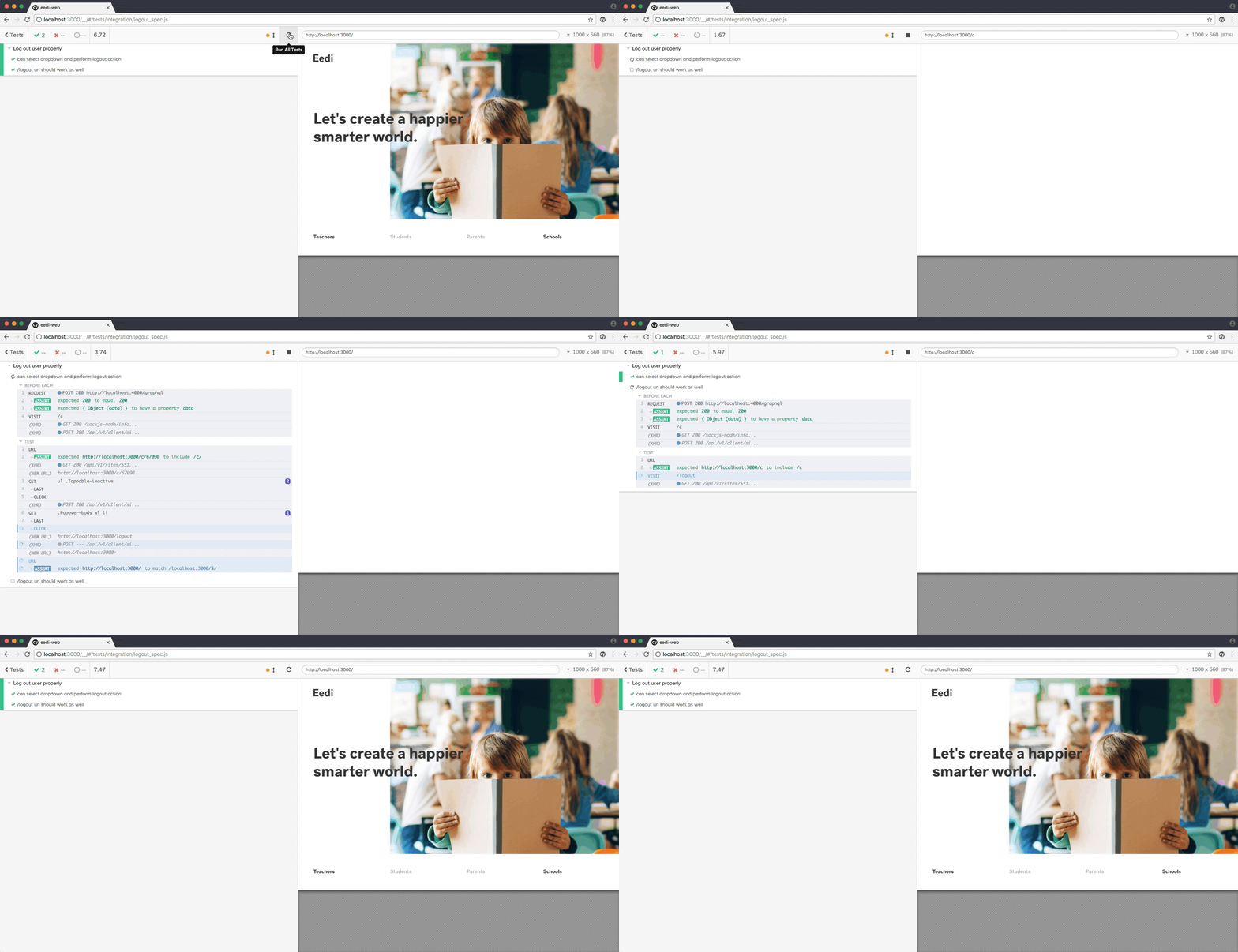
gif showing how tests pass

Summary

In short — writing tests with Cypress was real fun.

As advertised, setup is close to none, writing assertions is easy and feels natural, and GUI is, well, awesome! You can time travel, debug all steps, and since it all launches as an Electron app, we can even access developer tools to learn more about each action that happens.

The web has evolved. Finally, testing has too. Let’s all write some tests, and may the force be with you!

Insights

Learn more about Testing

How AI Agents Can Cut Manual QA by 30% — cover

Oct 30Article

How AI Agents Can Cut Manual QA by 30%

Explore an agentic QA workflow targeting 30% less manual effort across mobile, web, and TV, with test selection, failure triage, and validation.

Give QA Agents the Controls They Need With Appduct — cover

Oct 20Article

Give QA Agents the Controls They Need With Appduct

Use Appduct to give AI QA agents access to app functions for setting test conditions, triggering events, and checking results with UI automation.

cover

Oct 13Article

Agentic Mobile Testing With e2e and agent-device

See how e2e uses agent-device for AI-driven iOS and Android tests, combines exact assertions with agent actions, and replays cached steps without model calls.

Who Tests AI-Written Code? Inside TesterArmy With Szymon Rybczak — cover

Oct 12Podcast

Who Tests AI-Written Code? Inside TesterArmy With Szymon Rybczak

Szymon Rybczak explains how TesterArmy tests web and mobile apps with AI agents, creates test plans for pull requests, and fits into QA workflows.

cover

Aug 4Article

Automating Mobile QA With Cloud Agents

Code review and green CI checks do not prove a mobile app still works. Learn how cloud agents, agent-device, and runtime evidence can verify app behavior before merge.

cover

Jul 21Webinar

Behavior Review for AI-Native Delivery

AI can increase code output faster than teams can verify the real app. See why behavior review matters before merge.

cover

Jul 6Article

Introducing Sniffler: Run only the E2E tests your changes can affect

Sniffler maps changed files to affected E2E tests, so teams can avoid running the full suite on every pull request.

cover

Jun 17Talk

Automating Mobile QA with Cloud Agents

Michał Pierzchała will present Automating Mobile QA with Cloud Agents at Ship London on 17 June 2026.

cover

May 13Podcast

How AI Is Changing React Native Development and Testing

Zack Ebenfeld joins React Universe On Air to talk about how AI is changing React Native workflows, testing, QA, and day-to-day engineering work.

cover

Apr 14Article

Agent React DevTools: Give AI Agents Access to React Internals

Agent React DevTools gives AI agents access to the React component tree, state, and performance data, enabling deeper debugging and more reliable QA for React and React Native apps.

cover

Mar 19Live Stream

Agent Device, AI workflows, and mobile testing in practice

A discussion on Agent Device, AI-driven workflows, and testing mobile apps using simulators and accessibility data.

cover

Aug 23Podcast

Introducing E2E Tests to React Native Core

This episode of the React Native Show dives into the recent introduction of End-to-End (E2E) testing in RNTester. Join us as we unpack the thought process, technical considerations, and practical implementation of this new approach to testing in React Native.

cover

Mar 19Tutorial

The Hard Way vs. The React Native AI SDK Way: Stop Writing Custom Modules for Every Model

Learn how React Native AI uses a unified provider model to switch between cloud and on-device LLMs without rewriting application logic, enabling reliable AI experiences online and offline.

cover

Mar 12Tutorial

Build Smarter Apps: Tool Calling & AI Orchestration Explained

Learn how on-device models in React Native can call tools, interact with external APIs, and return structured outputs you can use directly in application logic.

cover

Mar 5Tutorial

MLC LLM + React Native: On-Device AI Without the Pain

Learn how to run third-party on-device LLMs in React Native using MLC LLM. Choose your models, run them efficiently across platforms, and keep a unified JavaScript API with React Native AI.

cover

Feb 24Tutorial

Intelligent Fallbacks with Apple Intelligence in React Native

Learn how to use Apple’s built-in Foundation Models in React Native apps, reduce memory usage, and enable fast, fully on-device AI with React Native AI Apple.

cover

Feb 10Tutorial

What Is the React Native AI SDK? A Complete Intro & Quickstart

Learn why on-device AI matters for React Native apps, how local LLMs behave offline, and what problems React Native AI is designed to solve from day one.

cover

Jan 29Tutorial

Implementing an Android TurboModule with Kotlin

Learn how to implement a React Native TurboModule on Android, from the TypeScript spec and Codegen to the Kotlin implementation and package registration.

cover

Jan 19Tutorial

Working with Different Threads in Swift TurboModules

Learn how JavaScript, native module, background, and main threads interact in React Native TurboModules, and how to use GCD queues to run async work safely in Swift.

cover

Jan 9Tutorial

How to Add Type-Safe Constants to Swift TurboModules

Learn how to expose typed, immutable constants from a Swift TurboModule using Codegen, and get full end-to-end type safety between native and JavaScript.

cover

Dec 30Tutorial

Adding Event Emitters to Your TurboModule in Swift

Learn how to emit native events from a Swift TurboModule and subscribe to them in JavaScript, including proper memory management and Codegen integration.

cover

Dec 22Tutorial

Writing Your First TurboModule in Swift

Learn how to build a fully working TurboModule in Swift, integrate it with Codegen, and bridge it through Objective‑C inside an Expo app.