Time to Detox

Authors
Wojciech Szafraniec
Software Engineer
@
Callstack

Testing with React Native is something that I was always interested in. Being responsible for releasing several apps in our office, I follow a set of repetitive instructions to make sure that app is not going to break after upgrading. It’s good to look into ways to automate this process, so it is easier, faster and less error-prone.

To this day, there was never really a dedicated framework created with React Native in mind. There were native snapshots that Mike Grabowski blogged about last year, jest snapshots from Ferran Negre, cavy and appium e2e tests. Native snapshots and jest snapshots have been utilised in React Native core repository, adding precious value and confidence into the release pipeline.

However, none of them allowed me to turn on RNTester (react native official example app), click around and make sure we didn’t break Camera API or the bridge.

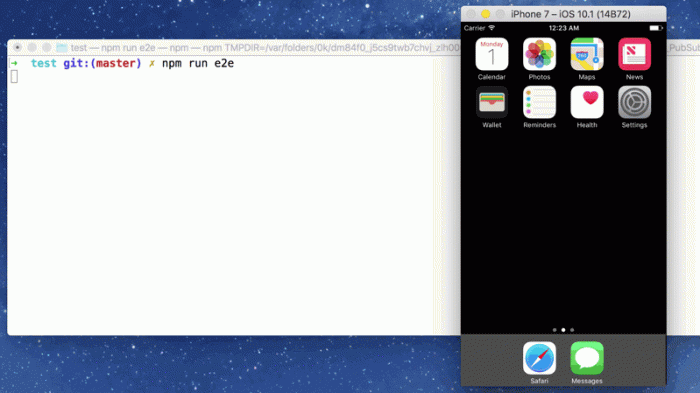
Detox is a brand new end-to-end test and automation library for React Native. Behind the scenes for testing is uses native solutions, Espressofor Android and EarlGrey for iOS. It runs your app on a simulator and gives you complete freedom to perform assertions on a real interface and interact with it by simulating arbitrary events. What’s great in Detox that it is a promise library so you don’t really care about <rte-code>wait(int) / timeouts<rte-code> like in Appium during e2etest.

Few months ago I was facing “timeout problem” when mobile app was working with some external printers whose printing time was depending on bluetooth / internet / usb connection. It was almost impossible to estimate printing time for one label when stretch test was about 1000 labels to print and if one of the printings took longer the test was broken.With promises I don’t need to specify time for action and test will not fail when connection breaks for a sec.

Cavy is an alternative that appeared recently as well, but the fact that it depends on <rte-code>refs<rte-code> made me advocate for Detox, since it presents a nicer API. Cavy also tests only your JavaScript part of code, not native one like Detox. Wix library also seems to be much faster while it’s working on web sockets. These things convinced me to give it a go!

It integrates well with your existing testing framework and it essentially boils down to the following:

describe('Main', () => {
it('should have welcome heading', async () => {
await expect(element(by.id('welcome'))).toBeVisible();
});
});
view raw cavy.js hosted with ❤ by GitHub

Don’t worry if it looks cryptic at first. We will get to it at the end of this article.

The official documentation suggests using Mocha. In this example, I’ll show you how to set it up with Jest, which comes with every React Native app by default.

Getting started

The quickest way to get started is to follow official documentation (Step 1 and Step 2). We are going to skip Step 3 as its tightly coupled to Mocha. The installation instructions look complex, but in reality, it turned out to be a really smooth process.

We will start by adding Jest to our dependencies:

In my case, I have created 3 folders:

  • <rte-code>jest<rte-code> that contains setup files
  • <rte-code>__e2e__<rte-code> that contains our Detox tests
  • <rte-code>__tests__<rte-code> that contains other Jest tests

Now, in order to use Detox for all tests inside <rte-code>__e2e__<rte-code> folder, we need to integrate it with Jest. We can do it in every test file, but that would be a bit cumbersome.

What we can do instead is to set the following in package.json:

"jest": {
"preset": "react-native",
"bail": true,
"setupTestFrameworkScriptFile": "<rootDir>/jest/setup.js"
}
view raw package.json hosted with ❤ by GitHub

Here, setupTestFrameworkScriptFile can be used to configure testing framework right before the test suite is going to be run. It’s a nice alternative to repeating config in every file.

The following setup.js file is straight copy from official documentation with an exception that we use Jest API instead of Mocha one:

const detox = require('detox');
const config = require('../package.json').detox;
jasmine.DEFAULT_TIMEOUT_INTERVAL = 120000;
/**
* If we are running `__e2e__` tests, we want to setup and configure
* detox.
*/
if (process.argv[2].includes('__e2e__')) {
beforeAll(async () => {
await detox.init(config);
});
beforeEach(async () => {
await device.reloadReactNative();
});
afterAll(async () => {
await detox.cleanup();
});
}
view raw setup.js hosted with ❤ by GitHub

And that’s it! You are all set!

You can browse the full example in Mike’s repository.

Writing tests

Before interacting with your components, you have to give them a name so that the testing framework can interact with it. This can be done by setting a special <rte-code>testID<rte-code> prop on any built-in React Native component.

Both platforms in native implementations has setter for <rte-code>testID<rte-code>

In Android:

public static final String PROP_TEST_ID = "testID";
// setter for test id in react native for Android (Java implementation of base view manager)
@ReactProp(name = PROP_TEST_ID)
public void setTestId(T view, String testId) {
view.setTag(R.id.react_test_id, testId);
view.setTag(testId);
}

In iOS:

RCT_REMAP_VIEW_PROPERTY(testID, reactAccessibilityElement.accessibilityIdentifier, NSString)

For example, let’s make sure that default React Native app has a Welcome to React Native heading.

To do so, we first are going to open index.ios.js and set testID to welcome:

<Text testID="welcome" style={styles.welcome}>
Welcome to React Native!
</Text>
view raw index.ios.js hosted with ❤ by GitHub

‍Now, lets create a <rte-code>__e2e__/welcome.spec.js<rte-code> file and make sure the content is visible:

describe('Main', () => {
it('should have welcome heading', async () => {
await expect(element(by.id('welcome'))).toBeVisible();
});
});

And that’s it! You can now run:

yarn test-e2e
view raw yarn test-e2e hosted with ❤ by GitHub

To see the results of your work.

yarn test e2e

You can browse the rest of Detox API to explore different matchers and expectations.

I wrote this article together with Mike, so big shout out to Grabbou 🎉🎉🎉

Here's a link to the final repo.

Insights

Learn more about Testing

How AI Agents Can Cut Manual QA by 30% — cover

Oct 30Article

How AI Agents Can Cut Manual QA by 30%

Explore an agentic QA workflow targeting 30% less manual effort across mobile, web, and TV, with test selection, failure triage, and validation.

Give QA Agents the Controls They Need With Appduct — cover

Oct 20Article

Give QA Agents the Controls They Need With Appduct

Use Appduct to give AI QA agents access to app functions for setting test conditions, triggering events, and checking results with UI automation.

cover

Oct 13Article

Agentic Mobile Testing With e2e and agent-device

See how e2e uses agent-device for AI-driven iOS and Android tests, combines exact assertions with agent actions, and replays cached steps without model calls.

Who Tests AI-Written Code? Inside TesterArmy With Szymon Rybczak — cover

Oct 12Podcast

Who Tests AI-Written Code? Inside TesterArmy With Szymon Rybczak

Szymon Rybczak explains how TesterArmy tests web and mobile apps with AI agents, creates test plans for pull requests, and fits into QA workflows.

cover

Aug 4Article

Automating Mobile QA With Cloud Agents

Code review and green CI checks do not prove a mobile app still works. Learn how cloud agents, agent-device, and runtime evidence can verify app behavior before merge.

cover

Jul 21Webinar

Behavior Review for AI-Native Delivery

AI can increase code output faster than teams can verify the real app. See why behavior review matters before merge.

cover

Jul 6Article

Introducing Sniffler: Run only the E2E tests your changes can affect

Sniffler maps changed files to affected E2E tests, so teams can avoid running the full suite on every pull request.

cover

Jun 17Talk

Automating Mobile QA with Cloud Agents

Michał Pierzchała will present Automating Mobile QA with Cloud Agents at Ship London on 17 June 2026.

cover

May 13Podcast

How AI Is Changing React Native Development and Testing

Zack Ebenfeld joins React Universe On Air to talk about how AI is changing React Native workflows, testing, QA, and day-to-day engineering work.

cover

Apr 14Article

Agent React DevTools: Give AI Agents Access to React Internals

Agent React DevTools gives AI agents access to the React component tree, state, and performance data, enabling deeper debugging and more reliable QA for React and React Native apps.

cover

Mar 19Live Stream

Agent Device, AI workflows, and mobile testing in practice

A discussion on Agent Device, AI-driven workflows, and testing mobile apps using simulators and accessibility data.

cover

Aug 23Podcast

Introducing E2E Tests to React Native Core

This episode of the React Native Show dives into the recent introduction of End-to-End (E2E) testing in RNTester. Join us as we unpack the thought process, technical considerations, and practical implementation of this new approach to testing in React Native.

cover

Mar 19Tutorial

The Hard Way vs. The React Native AI SDK Way: Stop Writing Custom Modules for Every Model

Learn how React Native AI uses a unified provider model to switch between cloud and on-device LLMs without rewriting application logic, enabling reliable AI experiences online and offline.

cover

Mar 12Tutorial

Build Smarter Apps: Tool Calling & AI Orchestration Explained

Learn how on-device models in React Native can call tools, interact with external APIs, and return structured outputs you can use directly in application logic.

cover

Mar 5Tutorial

MLC LLM + React Native: On-Device AI Without the Pain

Learn how to run third-party on-device LLMs in React Native using MLC LLM. Choose your models, run them efficiently across platforms, and keep a unified JavaScript API with React Native AI.

cover

Feb 24Tutorial

Intelligent Fallbacks with Apple Intelligence in React Native

Learn how to use Apple’s built-in Foundation Models in React Native apps, reduce memory usage, and enable fast, fully on-device AI with React Native AI Apple.

cover

Feb 10Tutorial

What Is the React Native AI SDK? A Complete Intro & Quickstart

Learn why on-device AI matters for React Native apps, how local LLMs behave offline, and what problems React Native AI is designed to solve from day one.

cover

Jan 29Tutorial

Implementing an Android TurboModule with Kotlin

Learn how to implement a React Native TurboModule on Android, from the TypeScript spec and Codegen to the Kotlin implementation and package registration.

cover

Jan 19Tutorial

Working with Different Threads in Swift TurboModules

Learn how JavaScript, native module, background, and main threads interact in React Native TurboModules, and how to use GCD queues to run async work safely in Swift.

cover

Jan 9Tutorial

How to Add Type-Safe Constants to Swift TurboModules

Learn how to expose typed, immutable constants from a Swift TurboModule using Codegen, and get full end-to-end type safety between native and JavaScript.

cover

Dec 30Tutorial

Adding Event Emitters to Your TurboModule in Swift

Learn how to emit native events from a Swift TurboModule and subscribe to them in JavaScript, including proper memory management and Codegen integration.

cover

Dec 22Tutorial

Writing Your First TurboModule in Swift

Learn how to build a fully working TurboModule in Swift, integrate it with Codegen, and bridge it through Objective‑C inside an Expo app.