
What You Can Build With React Native on Meta Quest
Authors

Hello, there! New week, new adventure, right?
So far, our series about React Native on Meta Quest has focused on how to set it up and what to look out for when building apps.
Now, it’s time to put your skills into practice. One good reason to do that might be that Meta’s announced a Developer Competition: build an app using React Native and you could earn $25,000 if your submission stands out among the rest. With a total reward pool of $1.5 million, there are plenty of exciting categories to explore, so check them out!

To give you a head start, we’ve brainstormed with our team and came up with ideas on what to build if Callstack were participating in it. We’ve come up with five ideas that cover different categories and types of apps, so you should find some inspiration there.
Making the most of what VR offers
When thinking about what you want to build, take into consideration the unique features that VR offers. Take advantage of:
- 3D space
- Camera passthrough for AR
- Spatial audio
- Controllers with haptic feedback or hand tracking
It will make your app feel like it belongs on the device instead of being a port of the mobile version.
When thinking about what you can do with these features, try taking a fresh look at the well known ideas and making your own spin might be a path to success!
Meditation app
VR devices are great for building experiences that allow users to relax, meditate, and focus. You’re in control of ambience, surroundings, and other elements of the environment, so you can avoid distractions.
Reanimated and Skia are great choices for making beautiful and performant animations. Use them to guide users through the (relaxation) process. And if you like the challenge, try integrating visualizations with music.
If you need examples, Will Candillion recreated the Apple breathing exercise animation in React Native!

For an extra challenge, try adding audio tracks and syncing them with your visualizations to create an even more immersive experience. You can use expo-audio to integrate music and ambient sounds. Check out examples below for inspiration:
Interactive game
Building a game can be challenging because of its complexity, but if you’re up for it, creating a simple puzzle game can be a lot of fun! If you want to push yourself a bit more, try making a game that uses motion tracking or controllers; think Beat Saber or Fruit Ninja.
Another genre worth exploring is puzzle games like Sudoku or Nonogram (Picross). These types of games are great for experimenting with logic, design, and user feedback loops.
Focus on a single mechanic and build your gameplay loop around it. Don’t overcomplicate things; keeping it simple will make it easier to polish and more fun to play. A great example is Super Hot, which was created during 7-day game jam.
If you’re working in React Native and want to add 3D, React Three Fiber lets you render interactive scenes directly in your app. It’s a natural next step once you have a core mechanic. Start with the introduction and browse the examples to see what’s possible.
And if you’re feeling adventurous, try building a simple game in Godot using the recently released React Native integration. We haven’t tested it yet, but it could be an exciting challenge!
Mixed Reality
VR offers a unique way to interact with the environment around you. With camera passthrough, users can still see their real surroundings, and with some creativity, you can turn that into an AR-like experience that enhances what they see.
You can use it to overlay 2D and 3D elements in 3D space; think of placing digital art on a wall, adding floating text, or blending virtual objects into the user’s room.
To achieve this functionality, react-native-vision-camera is a great choice. Its Frame Processors let you modify the camera feed in real time, allowing you to add visual effects or layer dynamic content onto the scene.
You can also extend this by detecting real-world objects, like food, plants, or faces, and combining it with AI or other integrations, such as barcode scanners and face recognition. This opens up endless possibilities, from displaying extra information to changing how users perceive their surroundings.
Here are some example ideas:
- Apply face filters or AR masks.
- Preview how home decor will look in a room.
- Display nutritional info about food.
- Show step-by-step instructions over real-world objects.
- Provide context about art or exhibits when viewed through the camera.
For inspiration, think of experiences like First Encounters on Meta Quest or Face Raiders on Nintendo 3DS, both of which blend the real world with virtual elements to create something playful and immersive.
Social experiment
VR is still something new for most people, which makes it a perfect playground to test how humans might interact in digital spaces that feel real. So, why not make something collaborative and social?
In VR, you can build an experience that feels alive: where people don’t just watch but participate. The medium itself lets you explore socializing in a way that’s not possible on mobile or desktop. You get to use voice, gestures, and spatial presence, all the things that make real-life interaction natural, and translate them into code.
Think about concepts like a digital garden: a living, evolving space that grows with user interaction.
Then, there’s the idea of a shared drawing board, where people can co-create, share what they’ve made, remix it, and collaborate on something evolving together.
To make it all work in real time (multiple users editing, drawing, or talking together), you could use something like PartyKit. It’s built for multiplayer web apps, giving you server-side presence, WebSocket sync, and state-sharing without spinning up your own infra.
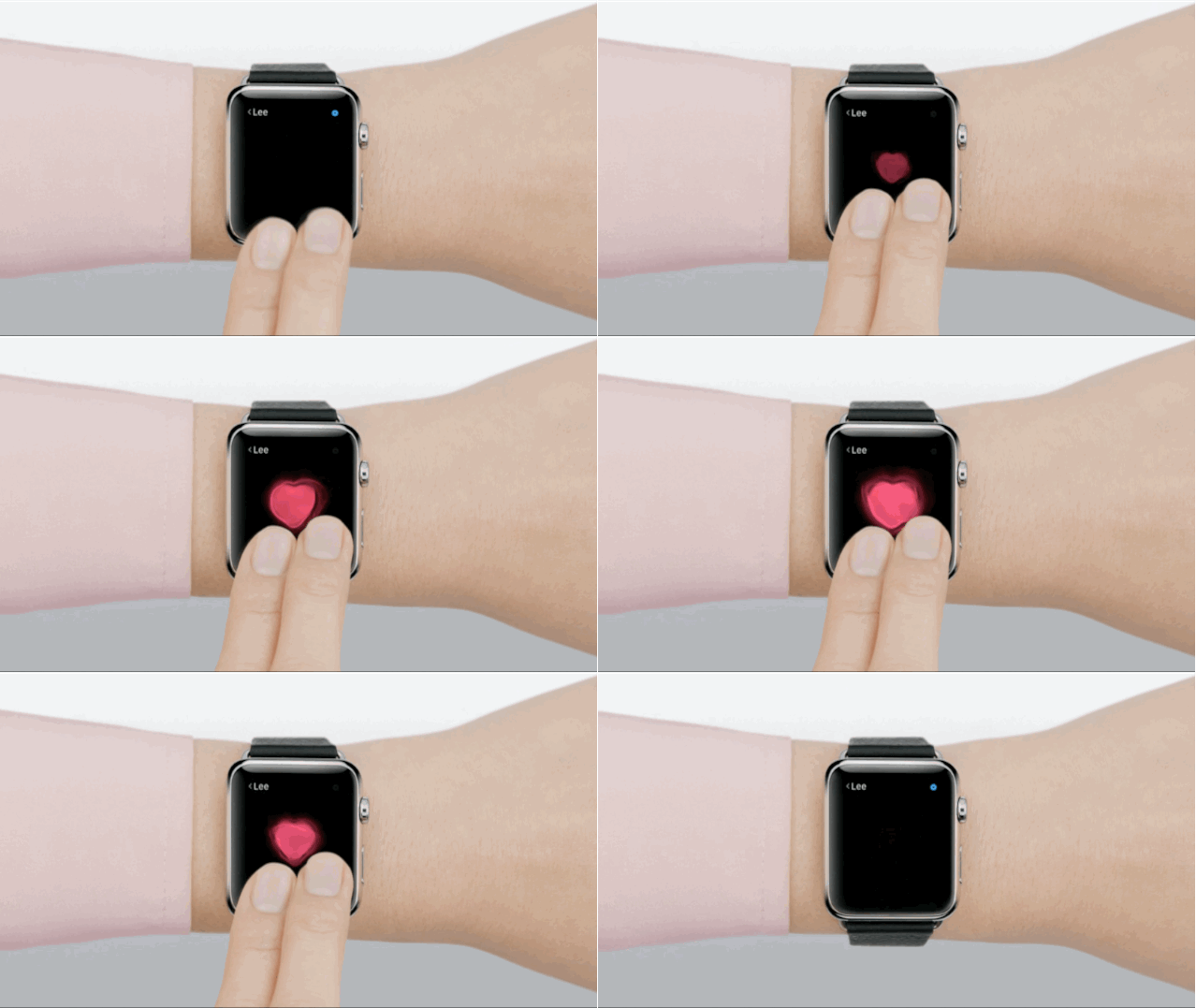
Another idea would be to bring back something like Digital Touch from iMessage: short, expressive signals you can send in real time. That kind of low-friction interaction could make VR social spaces feel way more human.
Summary
Ready to put your ideas into action? Meta’s Developer Competition is open now. Build something with React Native for a chance to win $25,000. There’s a $1.5 million total prize pool and multiple categories to explore, so find your niche and start creating.
With the ideas we’ve covered in this article, you’re ready to experiment and create something uniquely yours. Mix different approaches, test new interactions, and see how far you can push what’s possible. Go crazy and make it count. Good luck!


