Write React Native Apps in 2017 Style With MobX

Authors
Wojciech Szafraniec
Software Engineer
@
Callstack

Let’s start with a few words of introduction, React / React-Native is not only about Redux. This time I wanted to show the usage of MobX, which is pretty simple to develop. At the beginning you need to change your thinking a little bit, for a more objective-like in Java. After a few days of playing with MobX it seems that it is easier to understand when compared to Redux. Additionally, you can write less code as well. What do we want to achieve ? A simple app to search for music tracks in Spotify API.

My second goal was to use some modern technologies within the app:

  • <FlatList /> (not released yet, which will replace <ListView />),
  • React-Navigation,
  • StyledComponents for React-Native,
  • Flow.

Full example on Github repository

Getting started

Init React-Native app with -rc version which includes FlatList:

react-native init —-version=”0.43.0-rc.1” MobXApp
view raw init.js hosted with ❤ by GitHub

Install dependencies and plugins:

yarn add mobx mobx-react
yarn add react-navigation
yarn add styled-components
view raw mobx example hosted with ❤ by GitHub
yarn add babel-plugin-transform-class-properties babel-plugin-transform-decorators-legacy --dev
view raw gistfile1.txt hosted with ❤ by GitHub

I’ve listed only major dependencies, you can find the rest of them on Github repo (including things like linter / flow config).

In .babelrc file configure babel plugins in order to use decorators:

{
"presets": ["react-native"],
"plugins": ["transform-decorators-legacy"]
}
view raw .js hosted with ❤ by GitHub

Setting up navigation

We need to define StackNavigator which provides a way to move between screens, where each new screen is placed on top of a stack. In stack config we can define the initial route, styles and so on.

StackNavigator(RouteConfigs, StackNavigatorConfig)
view raw gistfile1.txt hosted with ❤ by GitHub

Implementation of Home (main container) will be described later.

I like to use one index.js file for both platforms, so we can remove all code from index.android/ios.js and place there:

import './src';

Then in our new root file which is src/index.js we are able to use Stack:

/* @flow */
import React, { Component } from 'react';
import {
AppRegistry,
} from 'react-native';
import Stack from './router';
export default class MobXApp extends Component {
render() {
return (
<Stack />
);
}
}
AppRegistry.registerComponent('MobXApp', () => MobXApp);
view raw index.js hosted with ❤ by GitHub

MobX — Logic in your app

Store implementation

The main responsibility of stores is to move logic and state out of your components into a standalone testable unit that can be used in both frontend and backend JavaScript.

We should start with creating stores folder in root directory. Inside of stores folder we add new file searchStore.js. It’s the place where we’ll define logic needed to handle search for Spotify songs.

/* @flow */
import axios from 'axios';
import { observable } from 'mobx';
import { Alert } from 'react-native';
const API_URL: string = 'https://api.spotify.com/v1/search';
export default class SearchStore {
@observable query = '';
@observable tracks = [];
get query() {
return this.query;
}
set query(artist: string) {
this.query = artist;
}
get tracks() {
return this.tracks;
}
set tracks(result: Array<Object>) {
this.tracks = result;
}
async getTrackList(query: string) {
if (!query) {
this.tracks = [];
return;
}
try {
const requestURL = `${API_URL}?q=${query}&type=track&limit=10`;
const response = await axios.get(requestURL);
this.tracks = response.data.tracks.items;
} catch (e) {
Alert.alert('Connection error', 'Couldn\'t fetch the data.');
}
}
}
view raw searchStore.js hosted with ❤ by GitHub
  1. Create class called SearchStore.
  2. Our class contains @observable properties that can be used on instance fields to get observable capabilities: @observable query — string for searching in Spotify API, @observable tracks — array which will contain list of tracks
  3. Setters and getters.
  4. Method getTrackList() to fetch songs from API, I used axios library to get data from blob file type.

Class has export default type, because I’m creating new instance for each store and grouping them in stores/index.js. When the app grows, it’ll allow me to easily inject each store to container with @inject decorator.

import SearchStore from './searchStore';
export default {
searchStore: new SearchStore(),
// place for other stores...
};
view raw storeIndex.js hosted with ❤ by GitHub

App Provider

<Provider /> passes stores to containers using React context. To achieve that we need to wrap our navigation component.

import { Provider } from ‘mobx-react’;
import Stack from ‘./router’;
import stores from ‘./stores’;
…
<Provider {…stores}>
<Stack />
</Provider>
view raw .js hosted with ❤ by GitHub

Preparing components

SearchInput

We should start with the input responsible for searching query. To style components I use styled-components for react-native.

import React from 'react';
import styled from 'styled-components/native';
const Container = styled.View`
margin-vertical: 15;
`;
const Input = styled.TextInput`
color: gray;
height: 20;
font-size: 18;
`;
type Props = {
value: string,
placeholder?: string,
onChangeText: Function,
}
export default function SearchInput(props: Props) {
return (
<Container>
<Input {...props} />
</Container>
);
}
view raw SearchInput.js hosted with ❤ by GitHub

With styled, component code looks cleaner. No need to use StyleSheet.create() && style={styles.something}With flow you can type all needed properties so environment will alert you if something is wrong.

ListItem

It’s a simple component responsible for rendering item in FlatList with few props to pass information about the song (image source and title).

Make it work — connecting container

Injecting stores, reactive components and state handling

By using @inject decorator we are able to pick each store we want in container, @observer function forces components to re-render each time when @observable value changes.

@inject(‘searchStore’)
@observer
export default class Home extends Component {
@observable query = '';
view raw .js hosted with ❤ by GitHub

I also used @observables to handle state of component instead of using normal state object. @observable query will be binded to the value displayed in <SearchInput />. Function onTextInputChange is using lodash.debounce method to make searching for a query smoother and prevent data re-fetch on each input change.

debounceInput = debounce((query) => { this.props.searchStore.getTrackList(query); }, 500);
onTextInputChange = (value: string) => {
this.query = value;
this.debounceInput(value);
}
render() {
return (
<Container>
<SearchInput
value={this.query}
onChangeText={(value) => { this.onTextInputChange(value); }}
placeholder="Search..."
/>
{this.props.searchStore.tracks && (
<FlatList
data={this.props.searchStore.tracks}
keyExtractor={(_, i) => i}
renderItem={({ item }) => (
<ListItem
imageUrl={item.album.images[0].url && item.album.images[0].url}
songName={item.name}
/>
)}
/>
)}
</Container>
);
}
}
view raw Home.js hosted with ❤ by GitHub

The new upcoming feature in React-Native is <FlatList />. I really wanted to check out, because things like dataSource, cloneWithRows and rowHasChanged are going to be deprecated. Data prop is just a plain array, keyExtractor prop is a function that extracts unique keys to list items, render methods work same as in <ListView /> but have different names. For example, I used a simple logical condition to render FlatList if there is data in searchStore.tracks which was our list of fetched tracks. renderItem goes through each element of array and mapping to <ListItem /> component.

Final effect:
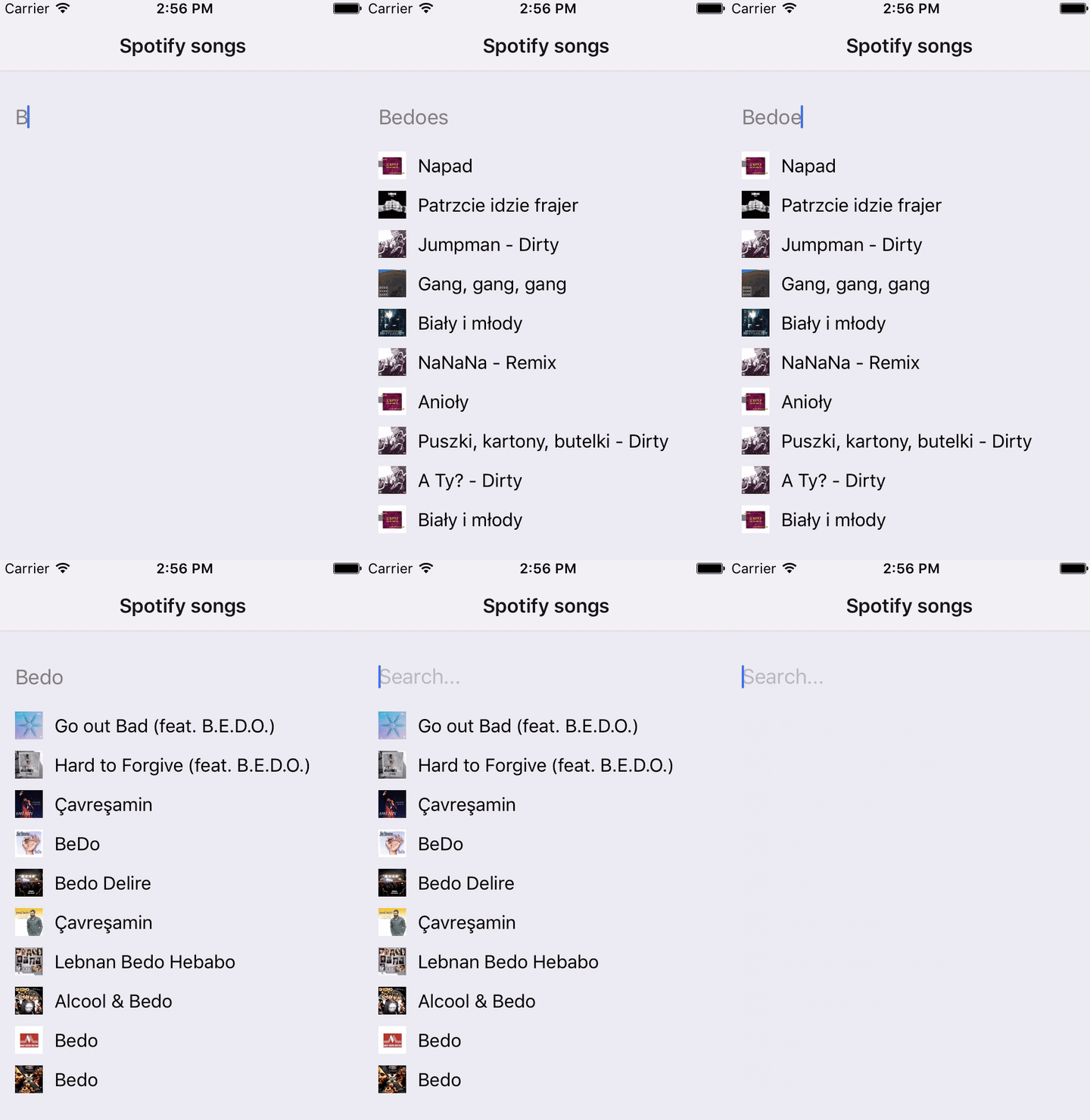
React Native app mobx example

For me MobX is really good for small apps because I spend less time preparing the project, and the whole setting up process is easier than in Redux where you need to configureStore, write actions and reducers. Here you handle the whole logic for store in a one file. Injecting stores might be frustrating if there are lots of them. FlatList looks great, but still lots of methods are not implemented yet, like ItemSeparatorComponent or getItemLayout and more, but it’s a candidate for RN43 and not sure if it’s going to be released. See the final repo.

If you’re interested in professional web or mobile application development or consulting, make sure to contact us. We specialize in the React Universe.

Insights

Learn more about React Native

cover

Aug 4Podcast

VisionCamera V5 With Marc Rousavy

Marc Rousavy joins Mike Grabowski to unpack VisionCamera v5, Nitro Modules, the constraints API, migration work, and what changed for React Native camera apps.

cover

Jul 1Podcast

Redraw for Effects Beyond Skia

William Candillon talks about where Redraw fits next to Skia, from physics-based rendering to camera effects, AR, and new UI patterns.

cover

Jun 29Article

Less Boilerplate, More Type Safety: React Navigation 8's Typed Hooks

React Navigation 8 improves typed hooks with screen-aware types, less boilerplate, and fewer unsafe casts in shared UI and nested navigators.

cover

Apr 30Live Stream

Build a React Native App With the TanStack Stack

Join Callstack’s live stream on building a React Native app from the ground up using the TanStack toolbelt.

cover

Apr 28Article

React Native production lessons from React Universe Meetup x Zalando

Lessons from React Universe Meetup x Zalando on React Native in production, covering brownfield performance, feed video, native API access, and on-device AI.

cover

Apr 23Talk

Shipping iOS Live Activities with React: The Voltra Story

How Voltra enables Live Activities and Dynamic Island views using React without writing Swift. A deep dive into iOS constraints and architecture.

cover

Apr 16Live Stream

React Native 0.85: Animation Backend and Key Updates

A recap of React Native 0.85, covering the new animation backend, DevTools improvements, and ecosystem takeaways.

cover

Mar 5Article

Keeping Screens Visible With <Activity mode="hidden">

A cross‑platform workaround to keep screens visible while <Activity mode="hidden"> unmounts effects on inactive screens by setting mode="hidden".

cover

Feb 25Article

React Native Monorepo With pnpm Workspaces

Set up a React Native monorepo with pnpm workspaces for mobile and Next.js web, including Metro fixes, hoisted node-linker, and shared packages.

cover

Feb 18Article

A Practical Guide to React Native Monorepo With Yarn Workspaces

Learn how to set up a React Native monorepo with Yarn workspaces for mobile and web, including Metro, Gradle, and shared packages.

cover

Feb 17Podcast

From Teddy Bears to Voice Agents: Kraen Hansen on Voice AI, Local-First & App Security

What happens when you combine voice agents and teddy bears? A hands-on look at local-first systems, voice AI, and security lessons from poking real apps.

cover

Jan 28Article

Bringing CSS Clipping to React Native

A deep look at how a single CSS feature moves through React Native’s New Architecture, from JavaScript styles to native rendering on iOS and Android.

cover

Mar 19Tutorial

The Hard Way vs. The React Native AI SDK Way: Stop Writing Custom Modules for Every Model

Learn how React Native AI uses a unified provider model to switch between cloud and on-device LLMs without rewriting application logic, enabling reliable AI experiences online and offline.

cover

Mar 12Tutorial

Build Smarter Apps: Tool Calling & AI Orchestration Explained

Learn how on-device models in React Native can call tools, interact with external APIs, and return structured outputs you can use directly in application logic.

cover

Mar 5Tutorial

MLC LLM + React Native: On-Device AI Without the Pain

Learn how to run third-party on-device LLMs in React Native using MLC LLM. Choose your models, run them efficiently across platforms, and keep a unified JavaScript API with React Native AI.

cover

Feb 24Tutorial

Intelligent Fallbacks with Apple Intelligence in React Native

Learn how to use Apple’s built-in Foundation Models in React Native apps, reduce memory usage, and enable fast, fully on-device AI with React Native AI Apple.

cover

Feb 10Tutorial

What Is the React Native AI SDK? A Complete Intro & Quickstart

Learn why on-device AI matters for React Native apps, how local LLMs behave offline, and what problems React Native AI is designed to solve from day one.

cover

Jan 29Tutorial

Implementing an Android TurboModule with Kotlin

Learn how to implement a React Native TurboModule on Android, from the TypeScript spec and Codegen to the Kotlin implementation and package registration.

cover

Jan 19Tutorial

Working with Different Threads in Swift TurboModules

Learn how JavaScript, native module, background, and main threads interact in React Native TurboModules, and how to use GCD queues to run async work safely in Swift.

cover

Jan 9Tutorial

How to Add Type-Safe Constants to Swift TurboModules

Learn how to expose typed, immutable constants from a Swift TurboModule using Codegen, and get full end-to-end type safety between native and JavaScript.

cover

Dec 30Tutorial

Adding Event Emitters to Your TurboModule in Swift

Learn how to emit native events from a Swift TurboModule and subscribe to them in JavaScript, including proper memory management and Codegen integration.

cover

Dec 22Tutorial

Writing Your First TurboModule in Swift

Learn how to build a fully working TurboModule in Swift, integrate it with Codegen, and bridge it through Objective‑C inside an Expo app.